
lua Uatis
WhatsApp with multiple agents, for R$ 29.90 per agent
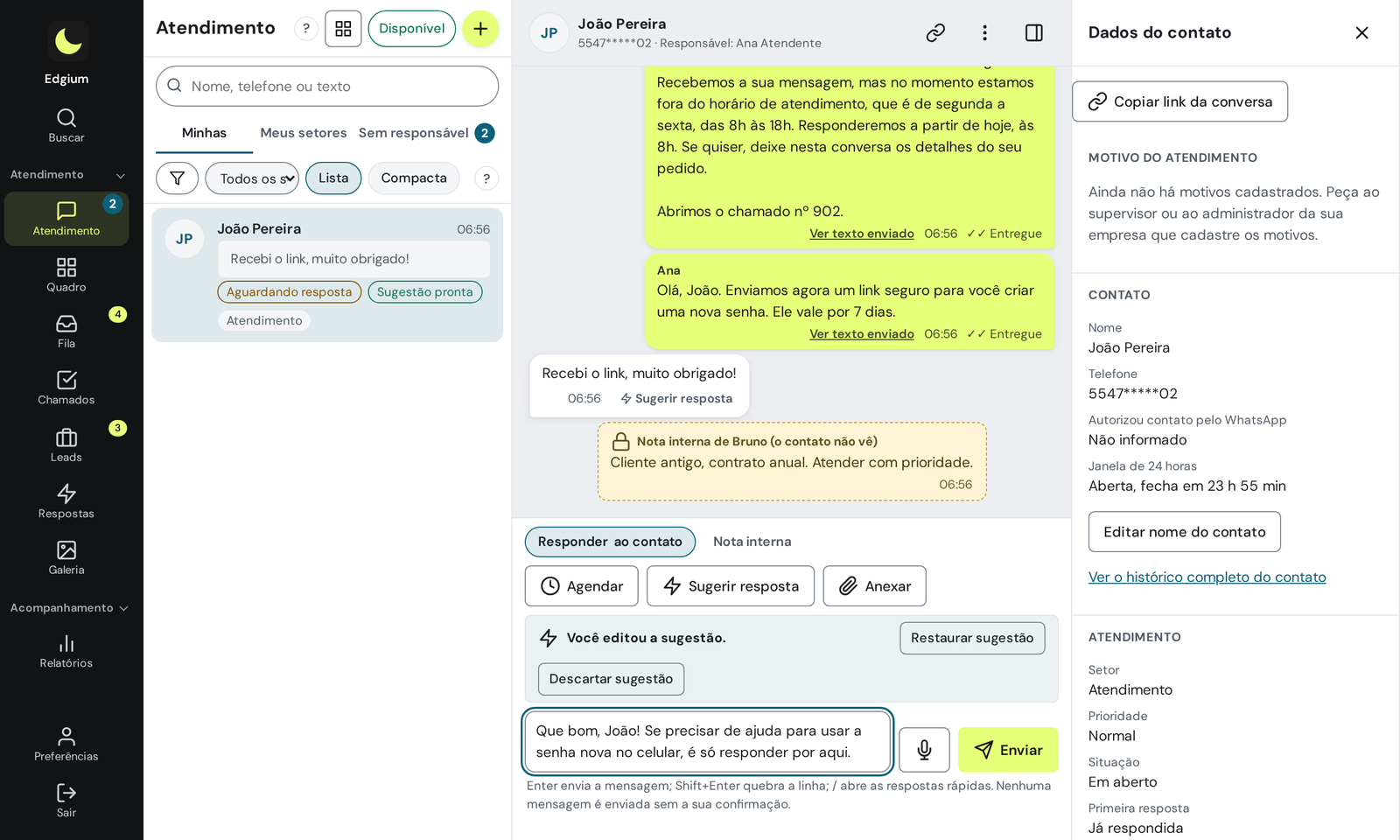
Your whole team answers the same number, each person with their own login, including in groups. The AI learns from your company's files and has the reply ready for the agent to review. It runs on Meta's official API and connects to the email, tickets and CRM in lua.email.
Prefer that our team contacts you? Leave your contact details
- R$ 29.90 per agent, per month
- Meta's official API
- Multiple numbers and groups on one screen
- Chatbots the company builds and tests
- Connected to email, tickets, and CRM
- On your computer and your phone
Every conversation has an owner
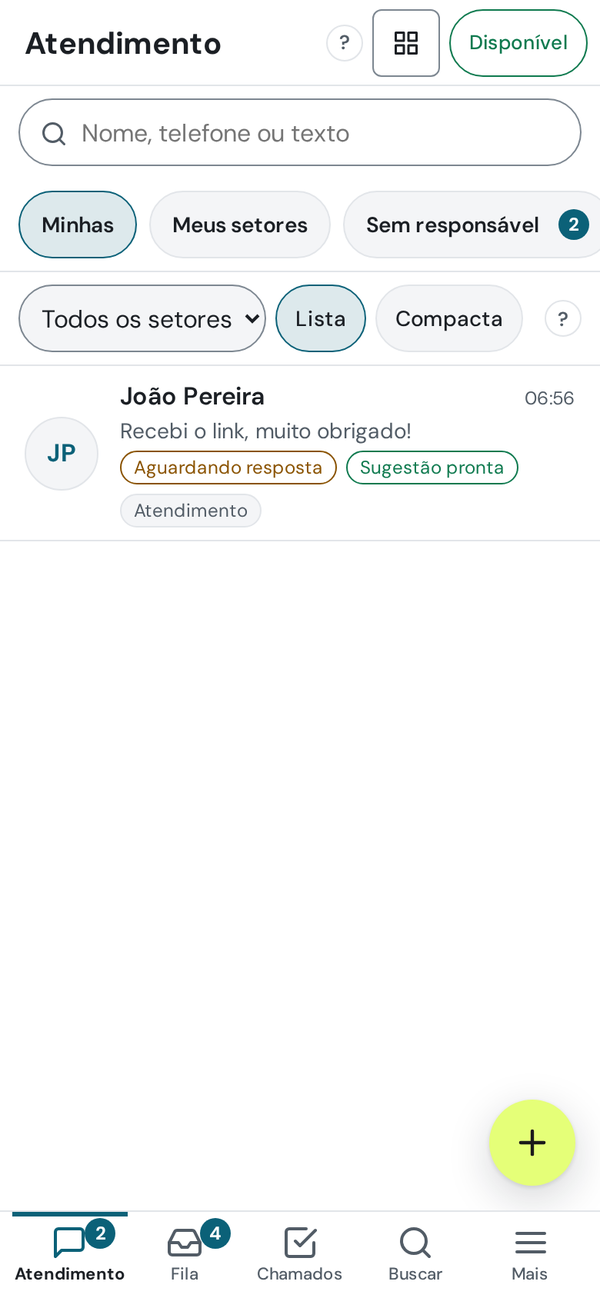
Your company number is no longer tied to one phone. Conversations arrive in a single list, sorted by department, and each one has an owner.
- Mine, My departments, and Unassigned tabs, with the response deadline for each conversation
- Transfer to another person or department, with the history included
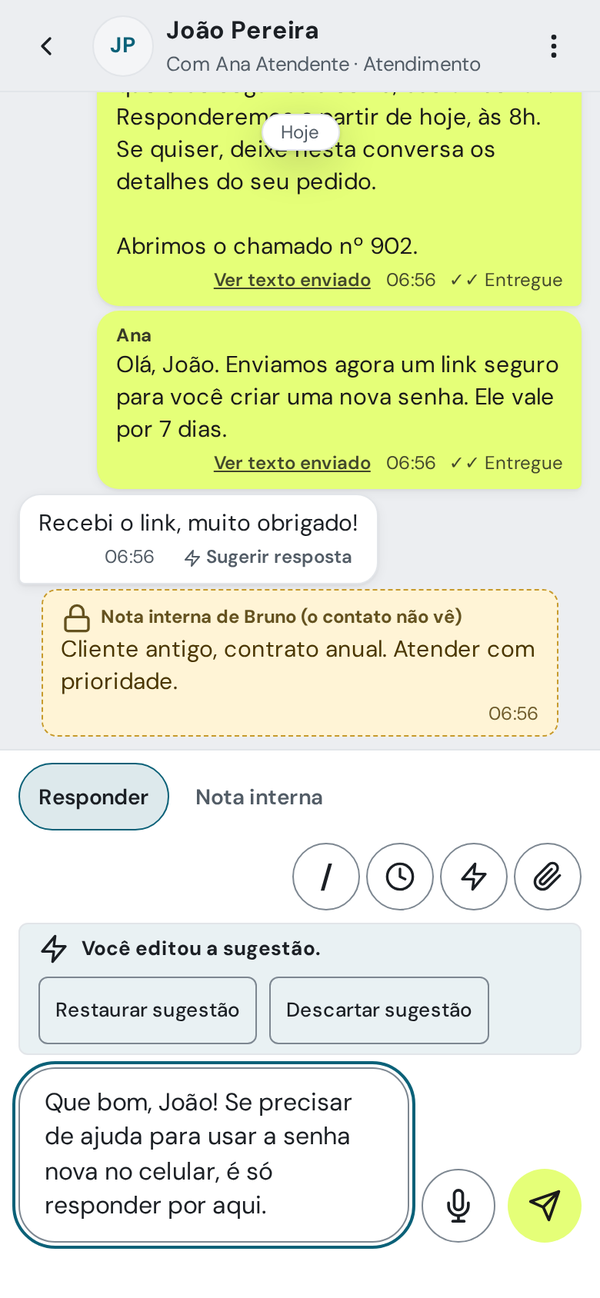
- Internal notes and mentions of a coworker, hidden from the contact
- Quick replies with /, attachments, audio, and scheduled messages
- Entry and team chatbots, with opening notice, acceptance of the terms and protocol (see Chatbots)
- Who has read each conversation, which stays unread for colleagues until someone on the team replies (a company option)
- The name of whoever replied on texts, images, documents, and audio, when the company wants to identify the team
- Each team's Pix key, sent with a shortcut, /pix
- Automatic message outside each department's business hours
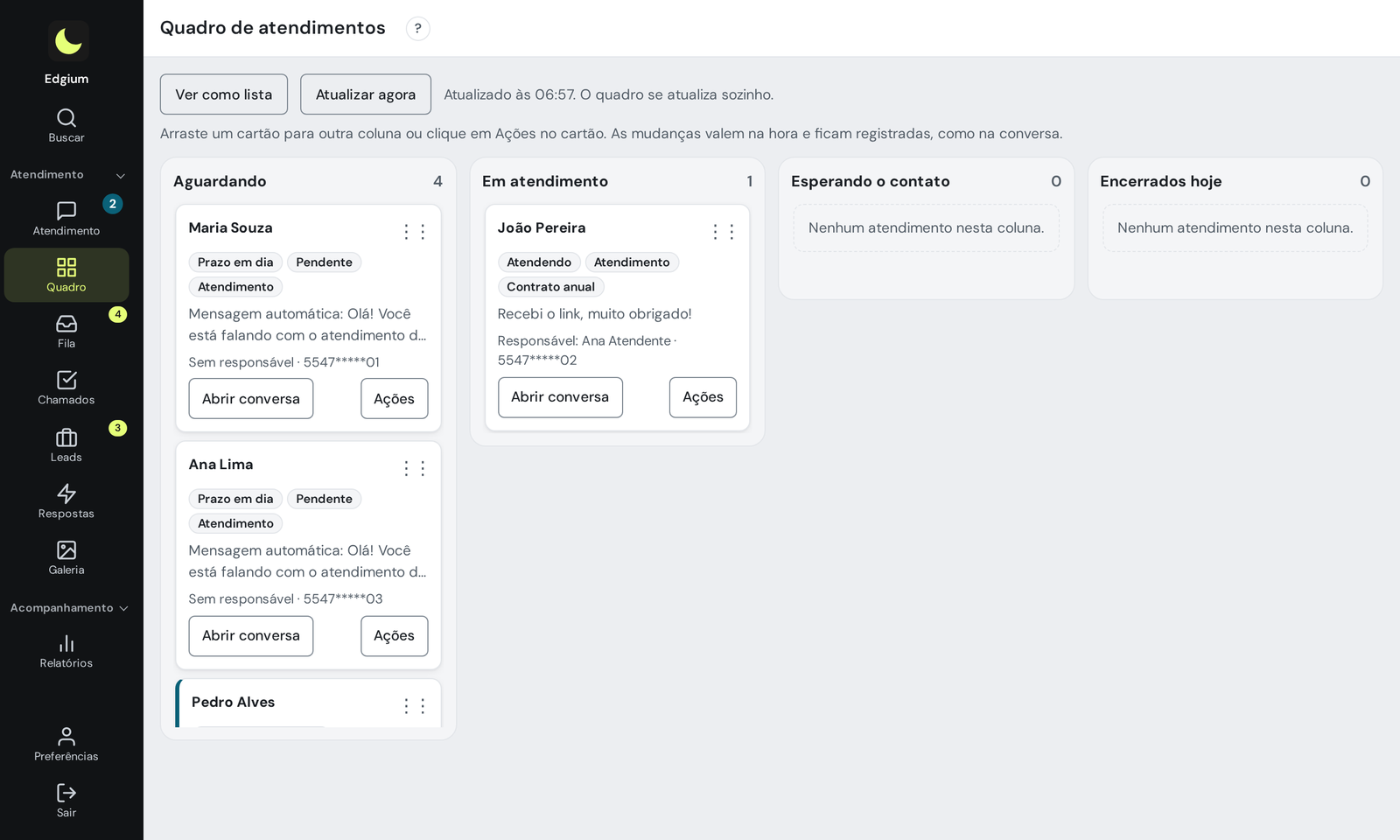
- Board with conversations by status, so you can drag them from one column to another
An assistant that knows your company
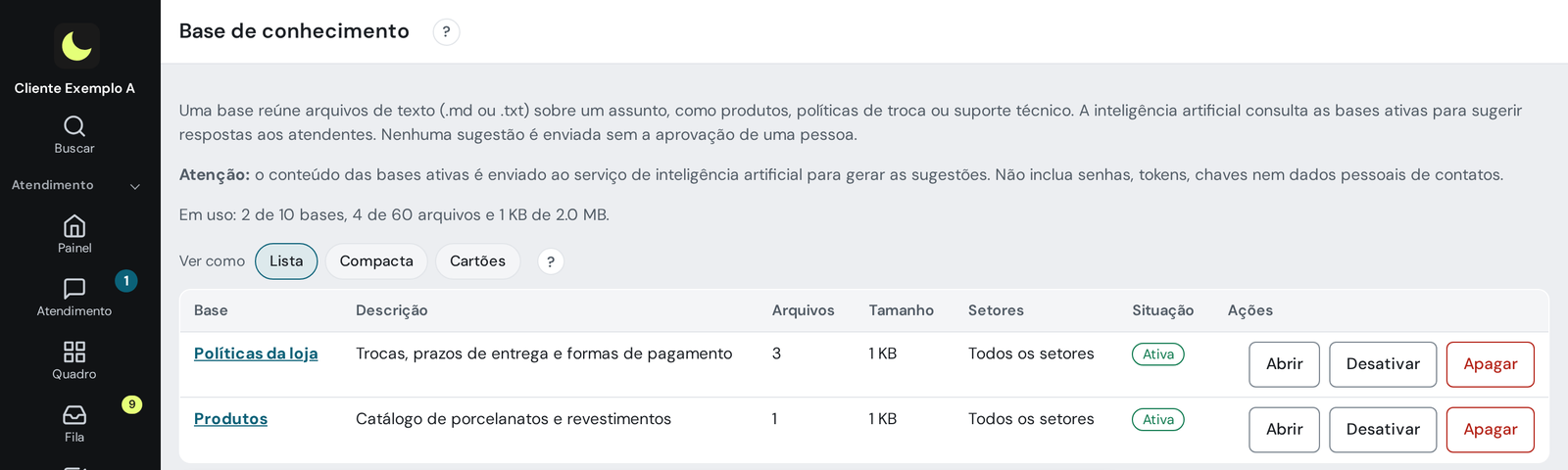
You upload your company's files (return policies, catalog, delivery times, support how-tos) and the AI starts answering based on them. When a customer writes, the reply is already waiting in the text box, along with the source it came from. The agent reviews it, edits it if needed, and sends it.
Simulated conversation, with sample data
Knowledge base
- politica-de-trocas.md
- prazos-de-entrega.md
- formas-de-pagamento.txt
- catalogo-porcelanatos.md
.md and .txt files uploaded by the company, organized by topic and by department.
Simulated conversation. The customer, Beatriz, asks whether she can return an unopened box of porcelain tiles. The system checks the politica-de-trocas.md file in the Knowledge base and suggests the reply: returns are accepted within 30 days, with the invoice and the box unopened. The agent, Ana, reviews it and sends it.
Trained on your files
Each company builds its own knowledge bases, such as Store policies or Products, and chooses which departments use each one. Changed a price? Replace the file, and the next replies will use the new value.
The knowledge stays in your account
The knowledge bases, each contact's history, and your team's internal notes are stored in your company's account. A customer of another company never sees or uses what belongs to you.
The source of every reply
Next to the suggestion, the agent sees which files it came from. If the agent's instruction contradicts a manual on a fact, such as a price or a deadline, the manual wins, and the screen shows a warning.
A person always approves
The suggested reply is never sent on its own. The agent decides what to send, and the system refuses passwords typed into the conversation.
Audio becomes text
Voice messages from customers can be transcribed right in the conversation, so you can read them instead of listening and find them later in search.
Analysis for the supervisor
In Insights, the AI reads the numbers for the period and summarizes what improved, what got worse, and where to act, without reading customer conversations.
Connect your AI assistant to your customer service
lua Uatis has an API and an MCP connector for assistants such as Claude. The supervisor asks in plain language and gets an answer with the customer service data:
- Which Support conversations have gone unanswered for more than an hour?
- How was the team's first response time this week?
- Create a quick reply with the new delivery time.
- Draft a reply to Beatriz about the return.
Each access uses a token with the permissions you choose. See everything an agent can do in API for AI agents and integrations.
On the official WhatsApp API, with your company's account
The number sits in your company's verified business account at Meta, with an approved display name. Our team walks you through the setup.
Approved message templates
To reach a customer who hasn't written in the last 24 hours, the team uses templates approved by Meta, submitted for approval and tracked on the same screen.
Meta's cost in plain sight
Template messages are charged by Meta, directly to your company, according to Meta's pricing table. lua Uatis shows an estimate of that cost in Reports.
Number quality, tracked
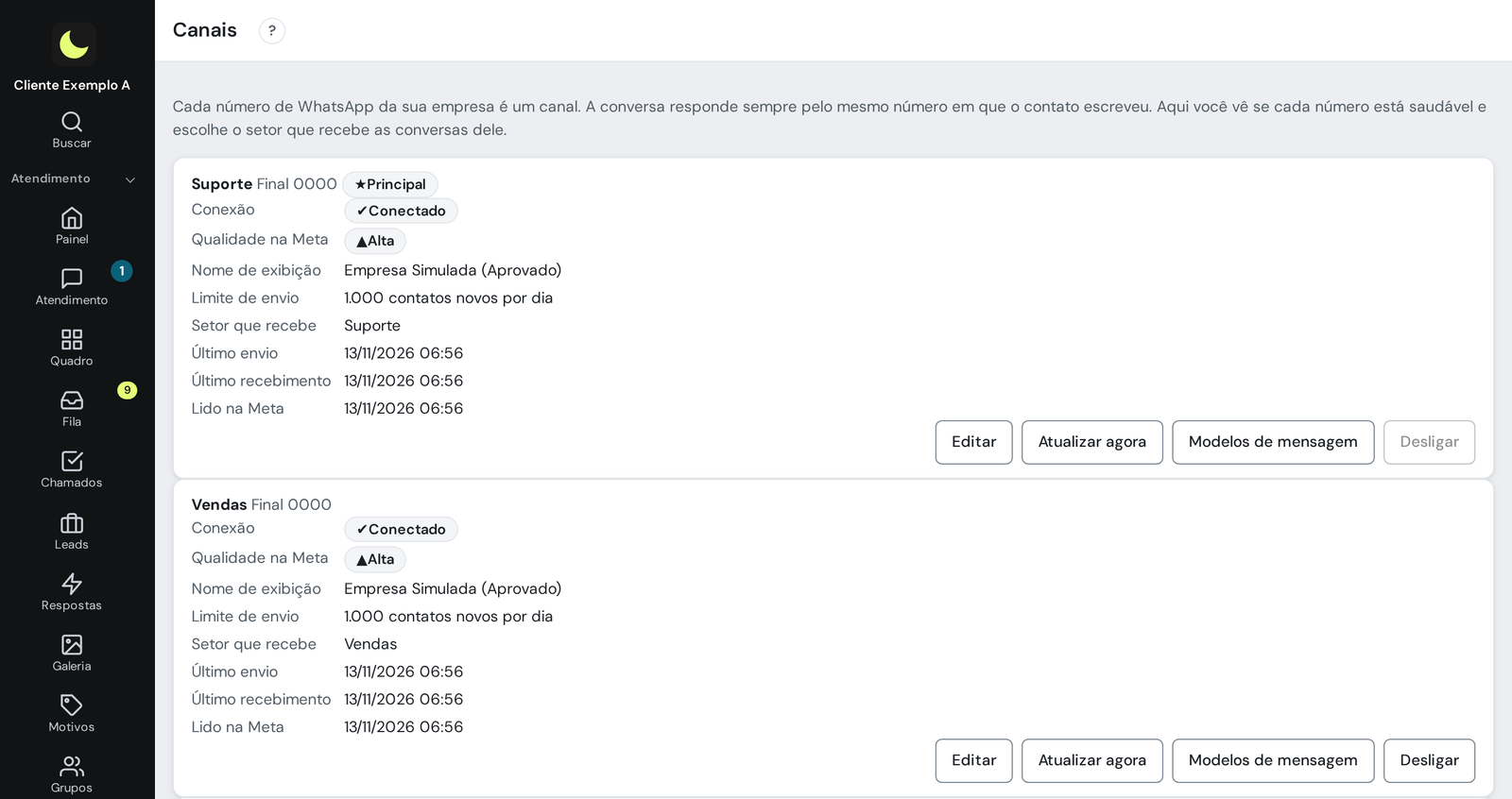
The Channels screen shows each number's quality and the sending limit Meta reports, so the team can act before any restriction.
Leads who already opted in
People who request contact on your website and authorize WhatsApp arrive as leads, ready for the team to reach with an approved template.
Multiple numbers, each for its own department
Sales on one number, support on another: each number is a channel, with the department that receives its conversations. Replies always go out from the same number the contact wrote to.
- Quality rating and messaging limit for each official API number, as reported by Meta
- Message templates submitted for approval and tracked on the same screen
Chatbots your company builds, tests and publishes
Before a conversation reaches a person, a chatbot can greet the contact, ask what they need and send them to the right department. Your company writes the texts, and they go out exactly as written: no chatbot reply is written by artificial intelligence.
From draft to publication
Several chatbots, each with its own name
The company can have up to 30 chatbots, such as "Support triage" or "Holiday on-call", and choose which one handles each situation. To start, there are ready-made templates: welcome and department choice, business hours, or a request for name and subject.
Test before publishing, go back when you need to
A test phone shows the conversation as the contact will see it, without sending anything, and publishing is only enabled after the test. Each publication is a version: if a change did not turn out well, the team goes back to the previous one with a click. Anyone already chatting finishes on the version they started with.
An entry chatbot for each number
Each number chooses the first chatbot the contact meets: the company's default, another one you pick, or none, when the conversation should go straight to the department.
A chatbot for each department
After the entry, a department can have its own chatbot, which asks the questions only it needs before a person answers. It can run when the conversation reaches the department, when someone transfers it there, or in both cases, and it never runs if a person is already in the conversation.
Messages and rules that apply to all chatbots
Opening notice, with a period
Holiday, schedule change, campaign: write the notice, choose the start and end dates and, if you like, add an image or a video. Each contact receives it once a day, in their first message, before any other reply.
Acceptance of the terms, on record
The contact receives the text, the link to the terms and the Accept and Do not accept buttons. The acceptance is stored with the date and the version of the terms, and when the text changes, the request returns to everyone. Whoever declines receives the message you wrote, and the conversation is closed.
Varied farewells and "not understood" phrases
Instead of repeating the same phrase every time, the service alternates between the messages the company registers: 2 to 10 farewells, drawn at random or chosen by the closing reason, and 2 to 10 variations of "not understood".
Commands the contact can use
Writing menu restarts the conversation, setores shows the list of departments, meu nome corrects the name on record and encerrar ends the conversation with a farewell. Atendente calls a person. The company turns on each command and chooses the words that count.
Protocol and connection to your company's system
Service protocol
Each conversation gets a number with the opening date, sent to the contact when it opens or closes, in the text you write. It appears in the conversation, on the board, in the reports and in search, and can go to the lua Chamados ticket or to your company's ticket system.
Querying your company's system during the conversation
The chatbot can ask your company's system, for example for the status of an order, and use the answer in the next text. If the system takes more than 5 seconds or does not answer, the conversation follows another path you defined.
Notices to your company's system
Your system can receive a notice when the chatbot finishes, when a protocol is generated, when the contact answers the acceptance of the terms and when the conversation is closed. If delivery fails, lua Uatis tries again up to 3 times.
Connections registered by the administrator
Each system is registered once, with a token, a signature or a username and password. The secret is stored encrypted and never shown again, and there is a connection test before saving.
The contact can always reach a person
At any point, whoever writes atendente goes to a person on the team. The same happens when the contact does not answer in the agreed time or when the chatbot does not understand two answers in a row. The chatbot never interrupts a person: with someone from the team in the conversation, it stops. See how to set up each screen in the lua Uatis manual.
Customer service in WhatsApp groups
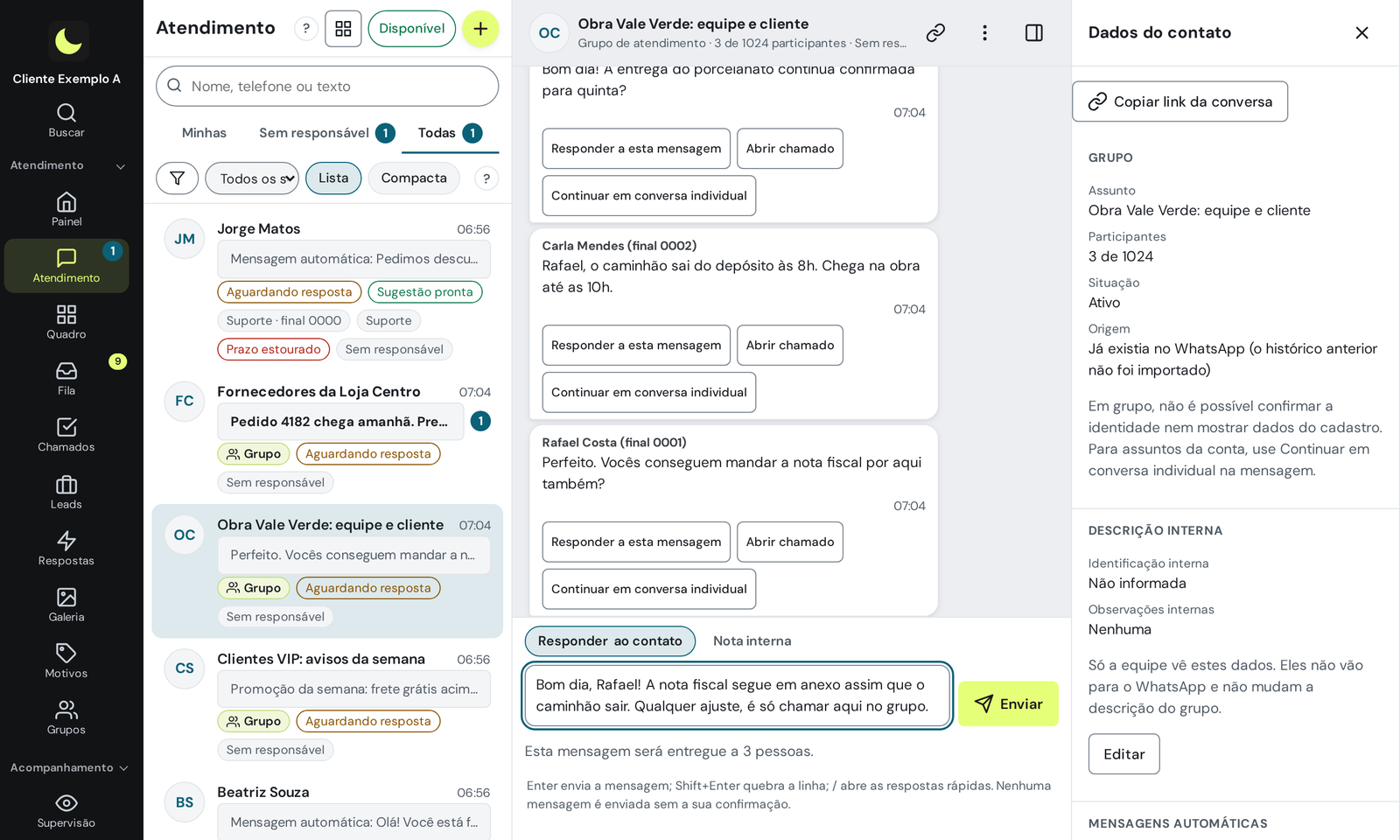
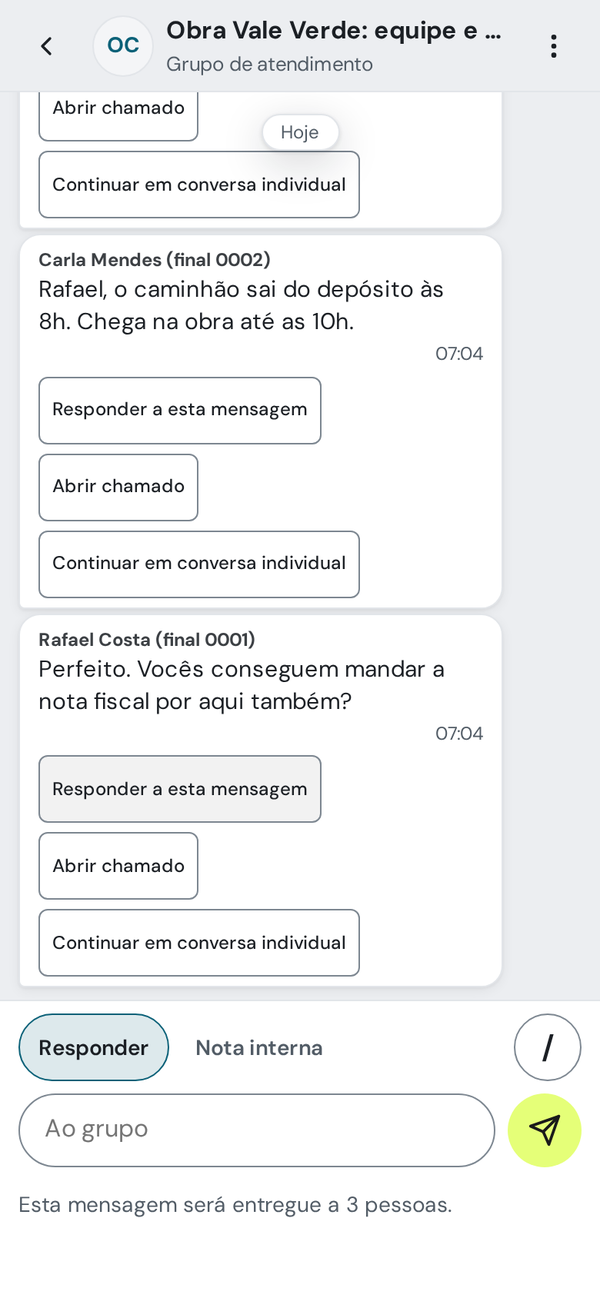
Many customers prefer to talk in a group: the construction site with the engineer and the buyer, the condo with the building manager, the company with its finance team. In lua Uatis, groups show up in the same conversation list, with an assignee, department and deadline, like any other conversation.
Groups that already exist
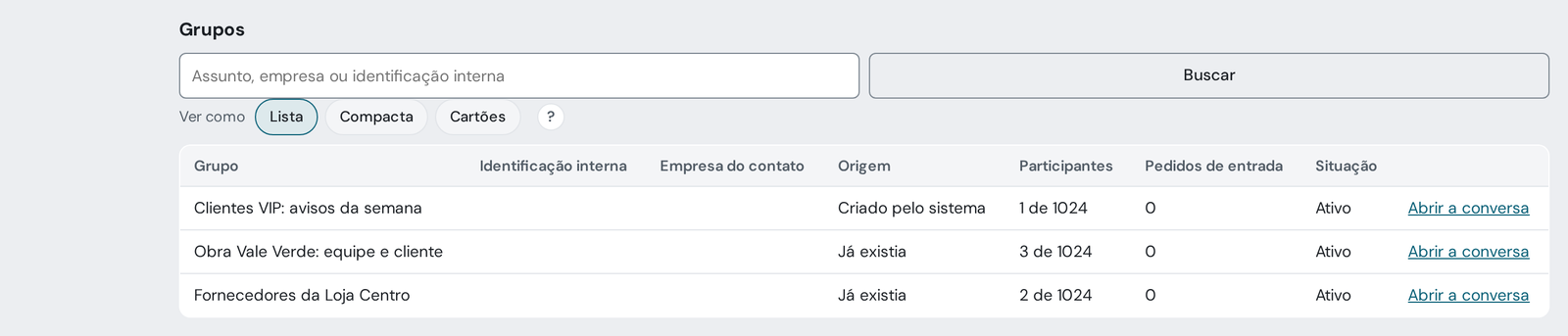
Groups your company number already belongs to show up in your customer service. The team replies from there, without needing the phone.
Groups created for the customer
The team creates a customer service group for the customer and their team, with a subject, a department, and an owner, and sends the invite link. Requests to join can require approval.
Every message with its author
You can reply to a specific message, open a ticket from it, or continue the topic in a private chat when it is something personal.
Labels only your team sees
Each group can have an internal label, such as the customer's name or the contract number, that only the team sees and that is included in search.
Calls become conversations too
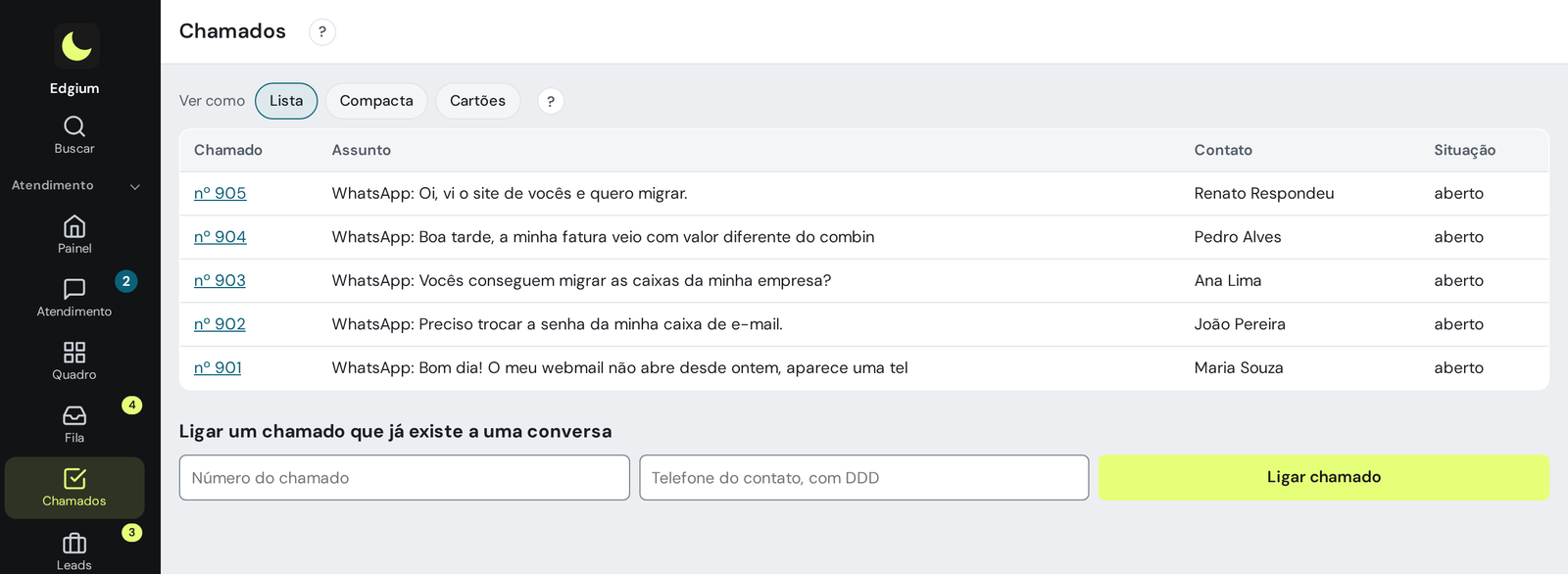
Not every customer writes: some call. In lua Uatis, the voicemail left on the landline and the call made on WhatsApp enter the service list, like any other conversation.
Landline voicemail becomes a conversation
With a landline number provided by lua, whoever calls hears a greeting and leaves a message. It arrives as a conversation, with the caller's number, the audio to listen to and the text of what was said, and goes to the department to reply on WhatsApp.
No automatic reply to the caller
The voicemail triggers no automatic messages. The conversation warns that the person called from a phone and may not have WhatsApp on that number, and the team decides how to get back to them.
WhatsApp call declined with a message
The number can decline voice and video calls and send the caller: "Hello. This number does not take calls on WhatsApp. Please write your message here and we will reply shortly."
The administrator decides
Under Channels, Edit, the administrator turns declining on or off and changes the text. The conversation records Voice call declined, with the time, and each contact receives at most one automatic message every 10 minutes.
Availability of a landline number is checked with our sales team. Ask on WhatsApp. See how each feature appears in the lua Uatis documentation.
Connected to what your company already uses on lua.email
WhatsApp customer service works together with email, tickets, and CRM. Each customer's history stays in a place your team already knows.
The same account as your email
If you already use lua.email, you sign in to customer service with your own email account. When someone leaves the company, they lose access along with their mailbox.
Tickets in lua Chamados
A conversation opens a ticket with its own number, and the customer gets that number right in the conversation. An existing ticket can also be linked to it.
Website leads in the CRM
People who request contact on your website and authorize WhatsApp show up on the Leads screen, ready for your team to reach out with one click.
Metrics and costs
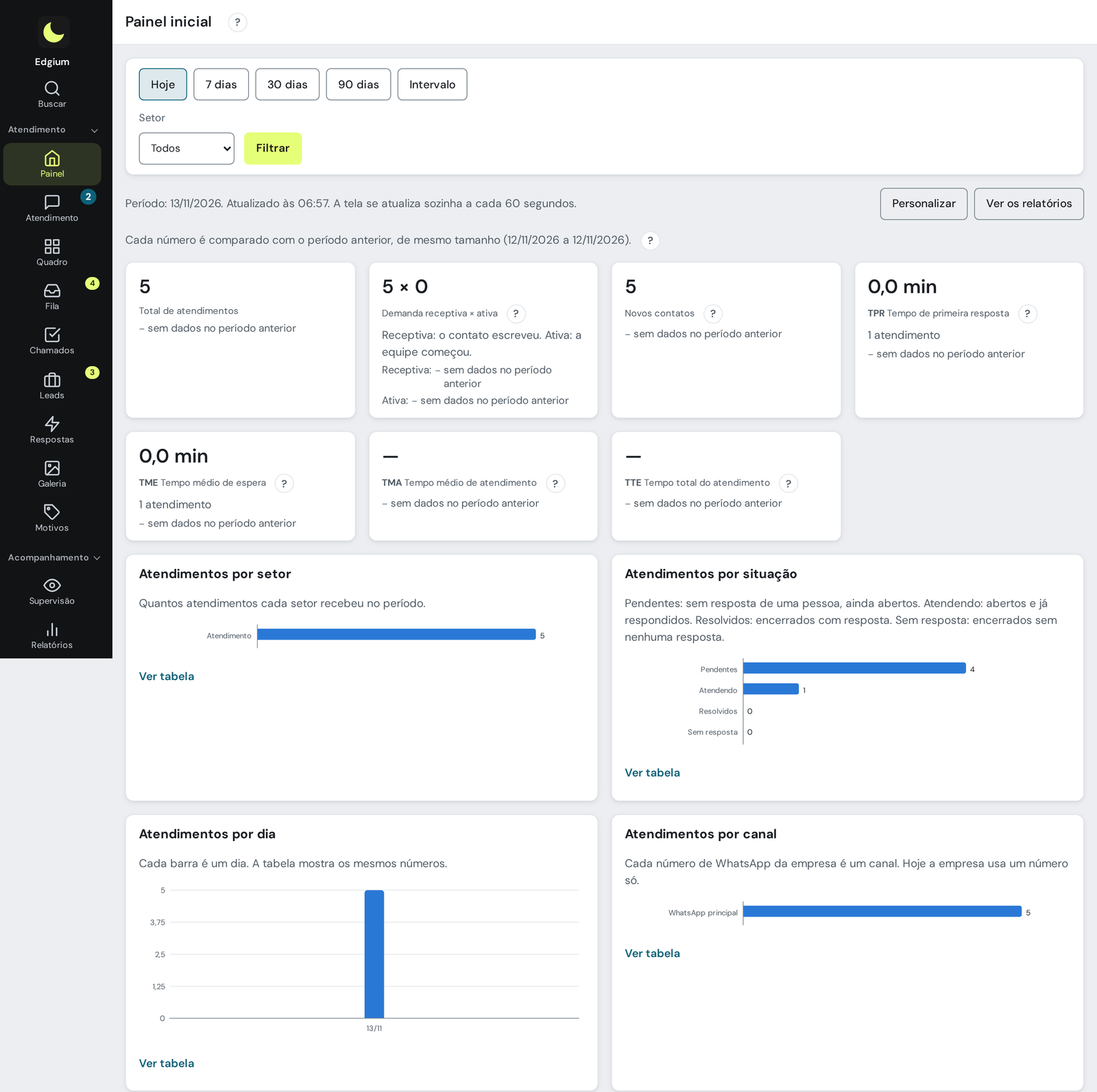
The Home dashboard shows conversations by department, by channel, and by person, first response time, wait time, and the estimated cost of Meta and the AI.
API for AI agents and integrations
lua Uatis has an API, a way for other systems to work with it. With your company's token, an access key the administrator creates on the API access screen, an artificial intelligence agent such as Claude, or the system your company already uses, works on customer service alongside your team.
Read conversations
The agent reads the list of conversations and the full history of each one, to understand the subject before replying.
A draft to approve or a direct reply
The reply can be left as a draft for someone on your team to review and approve. If your company allows it, the agent replies directly to whoever wrote in the last 24 hours.
Close with a reason
The agent closes the conversation with one of the reasons your company has set up. If the satisfaction survey is turned on, it goes out on closing, just as when a person closes the conversation.
Everything recorded in the Audit log
Every action goes into the Audit log with the token's name, which identifies who used it. The administrator chooses the permissions and the expiry of each token and can cancel it at any time.
Replies only, never sends to lists
Direct sending only replies to people who wrote to your company. It does not start conversations or send messages to contact lists.
To connect the agent, there is an MCP connector, the standard that assistants such as Claude use to access other systems, and a command-line program for those who automate with scripts. Our team sends the technical documentation: Ask for the documentation on WhatsApp or leave your contact details.
Customer service in your pocket, no app download needed
On a phone, lua Uatis opens in the browser and can be installed on the home screen. The agent gets new message notifications and replies with the same features as on a computer: quick replies, attachments, audio, and suggested replies.
The number still belongs to the company. When someone leaves the team, their access ends and the conversations stay.
How to get started
From the first conversation to your team answering, our team supports every step.
We talk with you
Tell us how many people answer and how many numbers your company uses. We show you the service working and answer your questions.
We connect your company's number
We support the setup of your company's Meta account and the connection of the number, which cannot be in use in the WhatsApp app.
The team starts answering
You register the agents and the teams, with our help, and conversations start arriving in a single list. The lua Uatis manual shows each screen.
Pricing per agent, with no minimum conversation plan
The lua Uatis license costs R$ 29.90 per agent, per month, and is subscribed for your company's account. You pay for the people who answer, not for the number of conversations.
| Team | Per month | Per year |
|---|---|---|
| 1 agent | R$ 29,90 | R$ 358,80 |
| 3 agents | R$ 89,70 | R$ 1.076,40 |
| 5 agents | R$ 149,50 | R$ 1.794,00 |
| 10 agents | R$ 299,00 | R$ 3.588,00 |
| 20 agents | R$ 598,00 | R$ 7.176,00 |
On the official API, template messages are charged by Meta, directly to your company, according to Meta's pricing table.
What the license includes
Customer service on computer and phone, departments, queue, board, quick replies, internal notes, multiple numbers, reports, and the connection to lua.email's email, tickets, and CRM. Artificial intelligence features are subscribed separately.
Questions about lua Uatis
How much does lua Uatis cost?
The license costs R$ 29.90 per agent, per month. A team of 5 agents pays R$ 149.50 per month. Messages that Meta charges on the official API are paid by your company directly to Meta. Artificial intelligence features are subscribed separately.
What does subscribing per account mean?
The company subscribes to lua Uatis for its own account and chooses how many agents have a license. Each agent signs in with their own user, and everything they do is recorded under their name.
Can I have more than one number?
Yes. Each number is a channel, with the department that receives its conversations, and the same team answers all of them in one list. Replies always go out from the number the contact wrote to.
Can multiple agents reply from the same number?
Yes. Each conversation has an owner, the others can see who is handling it, and they can leave internal notes the contact does not see. A supervisor monitors the queue and transfers conversations between people and departments.
Does lua Uatis have a chatbot?
Yes. The company builds chatbots with a name, tests the conversation on a test phone and publishes by versions, with the option to go back to the previous one. There is an entry chatbot for each number and another for each department, plus an opening notice with a period, acceptance of the terms, farewells, contact commands and a service protocol. The texts are the ones the company writes: no chatbot reply is written by artificial intelligence, and the contact can reach a person at any moment by writing atendente.
Does the chatbot query my company's system?
Yes. During the conversation, the chatbot can ask your company's system, for example for the status of an order, and use the answer in the next text. The system can also receive notices, such as the protocol generated and the conversation closed. The administrator registers each connection, and the secret is stored encrypted.
Does the AI reply to customers on its own?
No. It writes a draft in the reply box, based on the manuals your company registers, and the agent reviews it and clicks Send. No message goes out without a person's confirmation. The chatbots do not use artificial intelligence either: they only send the texts the company wrote.
Does lua Uatis support groups?
Yes. Groups the number already belongs to show up in customer service, and the team can create new groups for the customer, with an invite link and approval of who joins.
How does the AI learn about my company?
From the files you upload to the Knowledge base, in .md or .txt: policies, catalog, delivery times, how-tos. Each knowledge base can apply to all departments or only some. Replace a file, and the next replies will use the new version.
Can I connect Claude or another AI assistant to my customer service?
Yes. lua Uatis has an API, an MCP connector and a command line. With your company's token, the assistant reads conversations, leaves the reply as a draft for a person to approve or, if you allow it, replies directly to whoever wrote in the last 24 hours, and closes the conversation with a reason. Direct sending never sends messages to lists, and every action goes into the Audit log with the token's name.
Does the voicemail from callers to the landline reach lua Uatis?
Yes. With a landline number provided by lua, whoever calls hears a greeting and leaves a message. It appears as a conversation, with the caller's number, the audio to listen to and the text of what was said, and the team replies on WhatsApp. No automatic reply is sent to the caller. Availability of a landline number is checked with our sales team on WhatsApp.
What happens when someone calls the number on WhatsApp?
The number can decline voice and video calls and send the caller a message asking them to write. The administrator turns declining on or off and changes the text under Channels, Edit. The conversation records Voice call declined, with the time, and each contact receives at most one automatic message every 10 minutes.
Does it work on a phone?
Yes. Customer service opens in the phone's browser and can be installed on the home screen as an app, with new message notifications. There is nothing to download from the app store.
What do I need to use the official API?
A number that is not in use in the WhatsApp app, an account in Meta Business Manager, and your company's CNPJ. Our team will guide you through the setup.
Can I see who has already read a conversation?
Yes. With the individual reading option, the list shows who has seen each conversation, and it stays unread for colleagues until someone on the team replies to the customer. The customer sees none of this. The company chooses whether to use this option; the full explanation is in the manual.
Does the customer know who is replying?
Yes, if the company wants it. The agent's name, or a fixed team name, goes at the start of the text, in the caption of images, videos, and documents, and in a line before each audio message. The company can turn identification off, and each team can have its own format.
Can I send the Pix key in the conversation?
Yes. The administrator registers the Pix keys by team, and the agent types /pix to bring the key into the message field, check it, and send it. The key goes as text, so the customer can copy it and paste it into the banking app.
How does lua Uatis connect to email and tickets?
If you already use lua.email, you sign in with your own email account. A conversation can open a ticket in lua Chamados, and contact requests from your website arrive as CRM leads, ready for your team to reach out on WhatsApp.
Keep reading
Want to see lua Uatis with your team?
Tell us how many people answer and how many numbers your company uses. Our team shows customer service in action and walks you through the setup.
Show me how it works Subscribe on WhatsAppPrefer that our team contacts you? Leave your contact details