The license bill grows with the team
Everyone pays for Office and Teams, but a good part of the team only reads and sends email. With Bridge, these people move to lua.email and the domain stays the same.

Bridge is for companies that already have email on Google, Microsoft or their own server and want to stop treating every account the same way. Whoever makes the buying decision usually arrives with one of these situations.
Everyone pays for Office and Teams, but a good part of the team only reads and sends email. With Bridge, these people move to lua.email and the domain stays the same.
Switching everything at once is risky. Bridge lets the change happen area by area, with your domain working the whole time.
A system reads a mailbox, or an internal policy requires your own server. Those accounts stay there, and the rest goes wherever it costs less.
Your domain's email goes through Bridge, which filters it and delivers each account to the provider you chose.
You tell us how many accounts you have, where they are today and who uses Office, Teams or Docs. We show you the split and what it comes to with lua Bridge at R$ 2.50 per account, per month.
The partner or IT team that serves your company adjusts the MX, SPF, DKIM and DMARC and sets up the link to Google or Microsoft, following the step by step in the documentation.
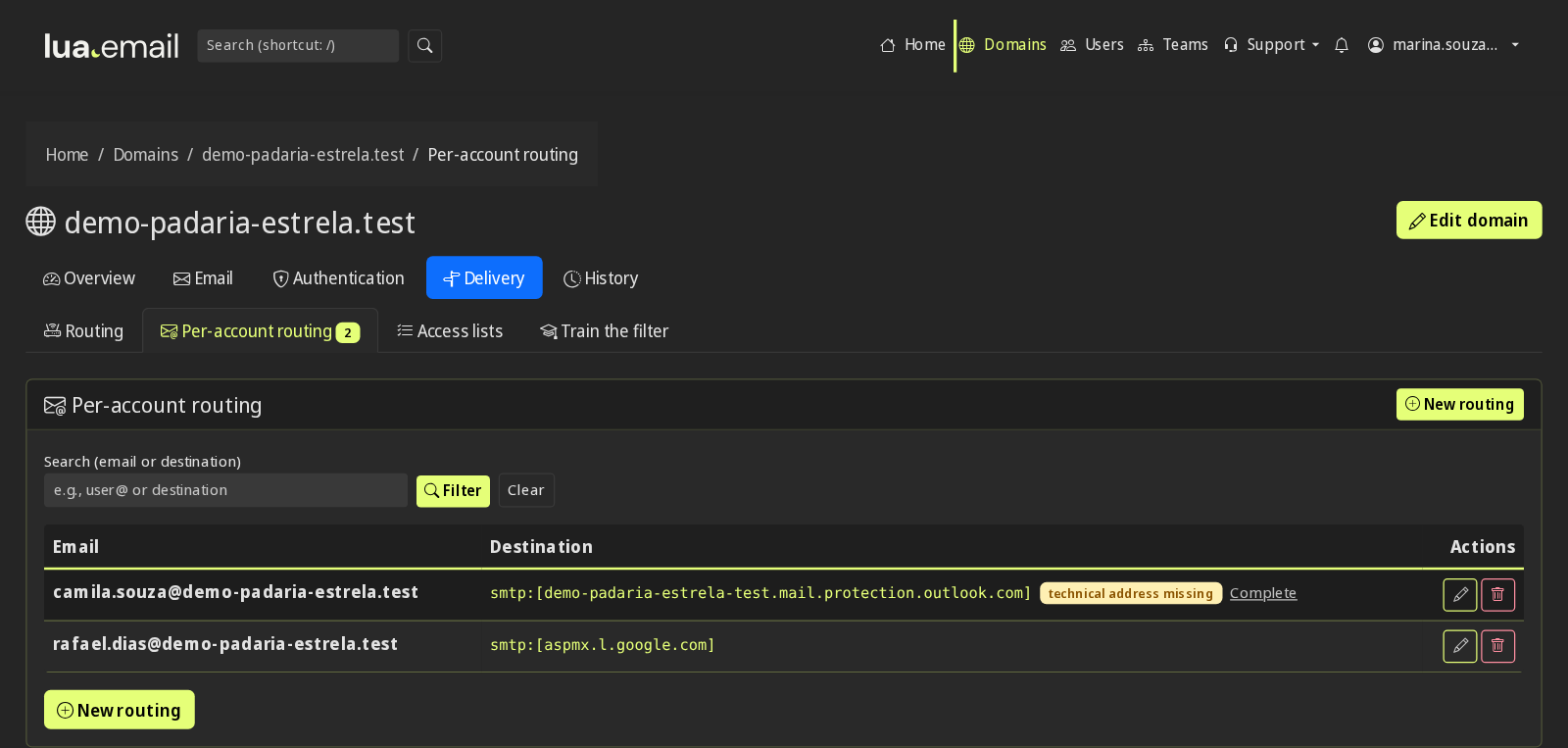
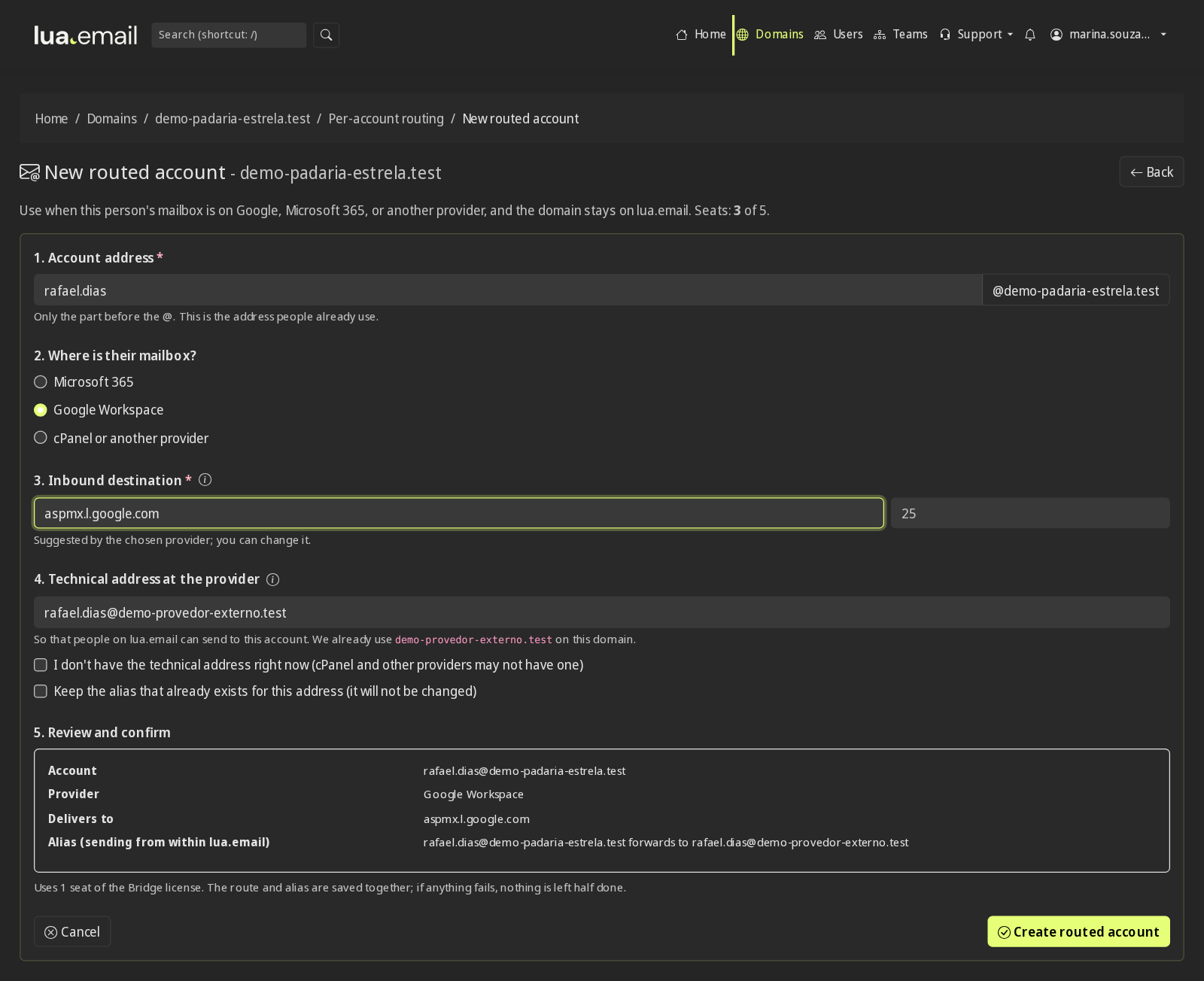
The administrator chooses where each account lives: lua.email, Google, Microsoft or a server that receives over SMTP. All of the domain's email goes through the filter, and moving a person to another provider is a matter of changing the account's destination.
With Bridge, some mailboxes stay on lua.email and some stay in the environment the company already uses, on the same domain. You choose whether this lasts only during the switch or stays that way.
To leave the current environment without moving everything in one day. Each area switches when it is ready, and the domain keeps receiving and sending normally the whole time.
Today
All accounts in the current environment. Email now arrives through Bridge, with antispam on all of them.
During the switch
Sales and finance are already on lua.email, with their history migrated. The board stays where it is, and everyone writes to each other normally.
Switch complete
All accounts on lua.email, at the same address as always.
For companies that want to keep some accounts in the current environment, because of a license, a system or an internal policy, and bring the rest to lua.email.
Always like this
People who need Office or Docs stay in the current environment, the mailbox a system reads stays on your own server, and the rest of the team uses lua.email. Moving someone is just changing the account's destination in the admin panel.
Example with the @yourcompany.com domain. In every case, the domain's email goes through the lua.email filter before reaching each provider.
Google Workspace and Microsoft 365 are excellent, but they cost R$ 33 to R$ 41 per user per month on the entry plan. Almost always, only part of the team really uses Office, Teams or Docs. With lua Bridge, the domain stops being all or nothing: each account sits where it makes sense for the work and the budget.
For people who live in Teams, Excel or Microsoft-based systems. Business Basic at R$ 33.40 per person, before taxes.
For people who work in Docs, Sheets or systems built on Google. Starter at R$ 40.90 per person after the first year.
For what has to stay in-house, because of a contract, an internal policy or a system that reads the mailbox. The server you already have stays useful, without having to grow along with the company.
For the rest of the team: email, calendar, contacts, files and chat, from R$ 8.90 per mailbox, with each mailbox sized per person.
The cost follows usage, not the number of people.
The company stops paying for Office and Teams for people who only read and send email. In the 20-person example below, the savings on licenses are more than half.
New people join lua.email, from R$ 8.90. If the role calls for Office or Teams, the account goes to Microsoft or Google, on the same address.
With the mailbox created at the new provider, the account's destination changes in the admin panel. The history comes through the migration, and the leftover license is canceled.
People who need it stay on the company server, and new accounts are born on lua.email. The server stops asking for disk, licenses and a new machine with every hire.
Leaving Google, Microsoft or your own server can happen area by area, with the domain working the whole time and each stage paid for when it happens.
Everything that reaches the domain goes through the lua.email antispam before any provider. Your own server does not need a separate antispam.
5 people stay on Google or Microsoft; the other 15 move to lua.email (5 GB). Right below, run the numbers for your own company.
| Scenario | Everyone on the provider | With lua Bridge | License savings |
|---|---|---|---|
| Google Workspace Starter (R$ 40.90) | R$ 818.00/month | R$ 338.00/month | R$ 480.00/month (59%) |
| Microsoft 365 Business Basic (R$ 33.40) | R$ 668.00/month | R$ 300.50/month | R$ 367.50/month (55%) |
Google or Microsoft for people who need Office, Teams or Docs. Everyone else on lua.email, from R$ 8.90 per mailbox.
The lua.email filter, with 99.91% accuracy, also protects the accounts that stay on Google and Microsoft, because everything goes through Bridge. How the antispam works
Everyone keeps @yourcompany.com, no matter where the mailbox is.
Messages between Google, Microsoft, your own server and lua.email flow normally, as if it were all one system.
The customer picks each account's provider in the admin panel and changes it whenever they want. The partner handles the domain setup. Routing by account in the admin panel
Start with the people already on Google or Microsoft and move or create accounts on lua.email gradually, with migration through our tool (per GB) or done by our team (per hour). Migration tool
Four common situations and what Bridge does in each.
If spam gets through your provider, Bridge receives all the domain's email, filters it and only then delivers. The accounts stay where they are, and the licenses stay with your company.
The domain receives and sends normally while accounts move, area by area. The ones that have not moved yet stay on the old provider, and the history comes through the migration.
The mailbox the internal system reads stays on the company server, and the others go to lua.email, on the same domain. The server only needs to receive over SMTP and send to Lua whatever is not its own.
Each domain has its own routing by account, and everything is tracked in the same admin panel. Headquarters stays on the provider it uses, and each branch or franchisee gets a mailbox on lua.email.
Prefer that our team contacts you? Leave your contact details
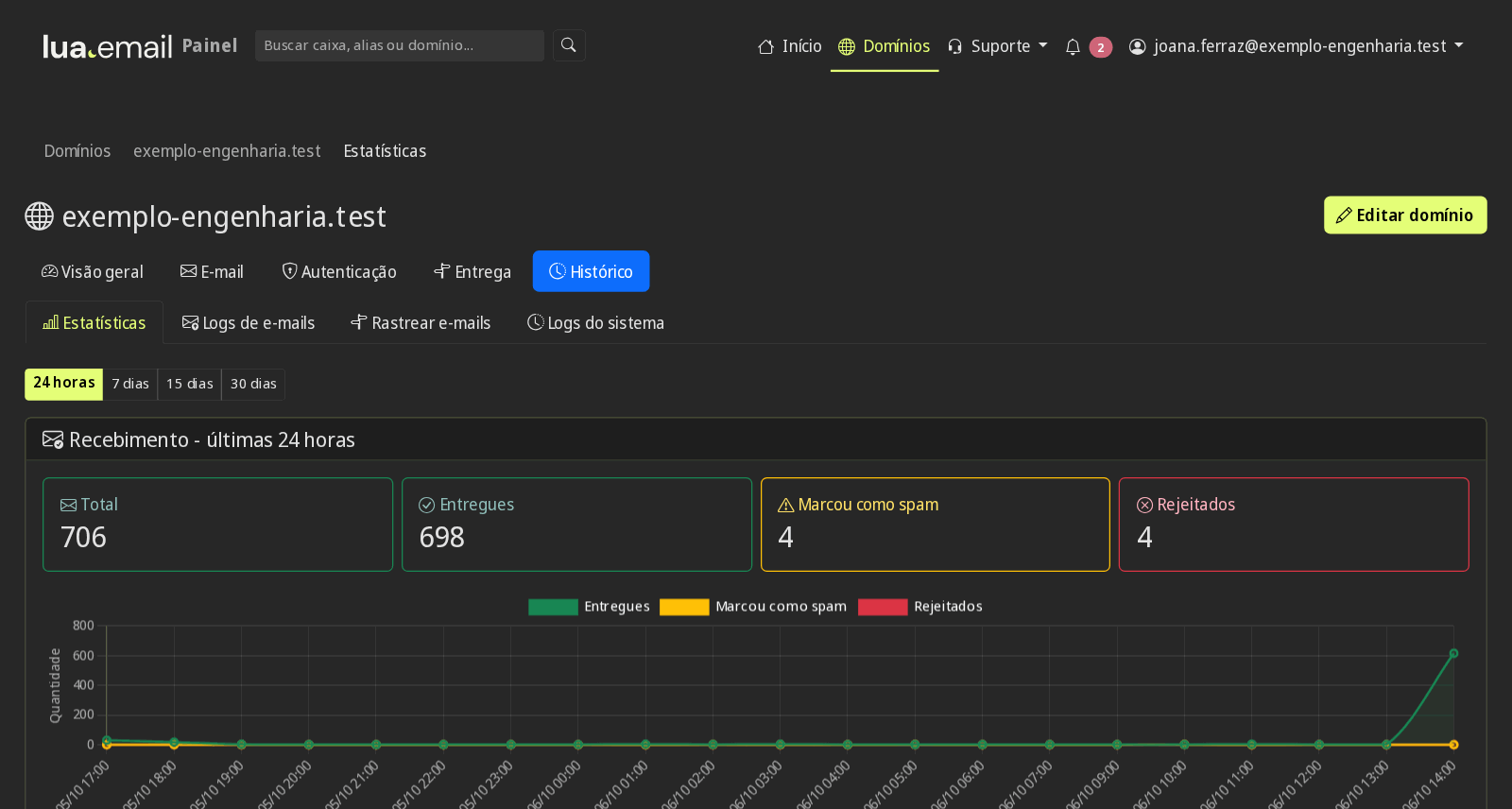
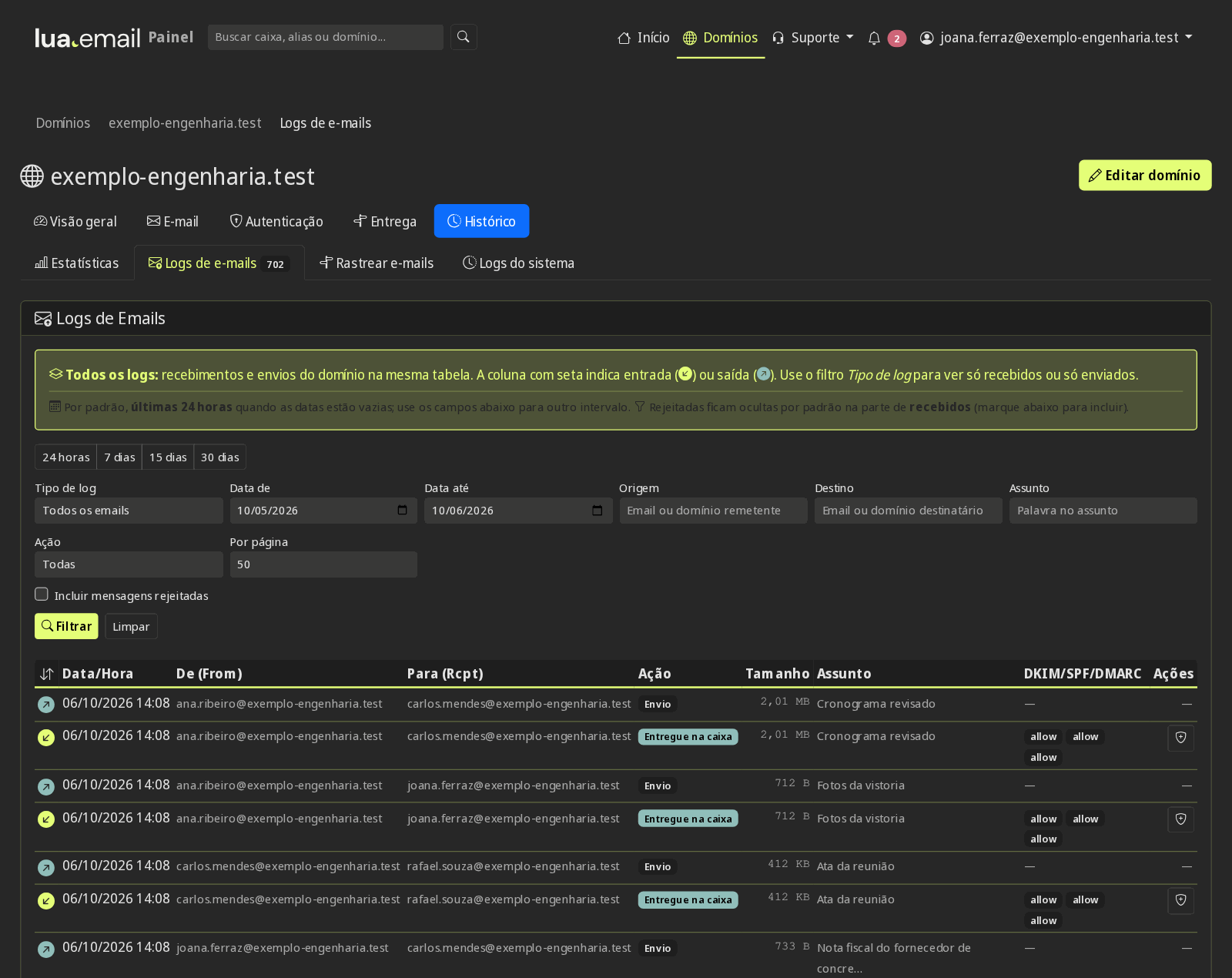
After activation, the routine lives in the admin panel, in Portuguese and without opening a ticket. The real screens are at the top of this page.
Bridge does not require starting with the entire domain. You choose a slice of whatever size your company feels safe with, and expand whenever you want.
One domain or a small group of accounts, preferably from an area that exchanges email with the others.
Send messages between accounts on different providers and check each one in the admin panel log, with the SPF, DKIM and DMARC result.
With the statistics in hand and the savings calculated, you decide whether to expand to the remaining accounts.
You choose the first slice, and lua Bridge is subscribed directly at checkout, at R$ 2.50 per account, per month. New mailboxes on lua.email are subscribed online, with the account ready in minutes by PIX.
Partners and managers on Microsoft 365 with Office and Teams. The team handling clients and deadlines on lua.email. See the examples for accounting and law firms.
Administration and management on Google or Microsoft, the mailbox the factory system reads on your own server, and production and logistics with professional email for R$ 8.90.
Headquarters on the provider it already uses. One mailbox for each store or franchisee on lua.email, without paying an expensive license per address. Run the numbers for your company
Because all of the domain's email goes through Bridge, the lua.email antispam and antivirus protect every account: those on lua.email and also those that stay on Google and Microsoft. Protection details
99.91% filter accuracy, measured by users' own corrections, before the email reaches any provider.
Suspicious attachments and links analyzed on the way in, for all the domain's accounts.
Allowed and blocked senders set in the admin panel, applying to the whole domain.
Sending limits that protect the domain's reputation, so messages keep arriving.
People who stay on lua.email with Bridge get the same controls as the other mailboxes, set once per group or for the whole domain. All of the domain's email, at any provider, goes through the antispam.
The whole group registers the code, in the app or by email, with recovery codes. With the requirement on, people cannot remove their last method in the webmail. See how it works
From 30 to 360 days per group, change at next sign-in, a warning 7 days before expiry and a spreadsheet report. See how it works
No sign-ins outside business hours or on holidays, and the webmail asks for the password again after the time limit your company chooses. See how it works
Webmail, Colabora, chat and phones with an Exchange account only from your company's IPs. The admin panel is never blocked. See how it works
The group's mailboxes have no IMAP, POP or SMTP in desktop and mobile apps, with webmail and Colabora working normally. See how it works
Screen lock required on the Exchange account, a list of connected phones, and an app password separate from the webmail one. See how it works
Mailboxes, aliases and groups that receive only from people on your domain. Anything from outside is rejected on arrival. See how it works
180-day message tracing, failed sign-ins with the source IP, admin panel logs, and support access with a stated reason. See how it works
No. People who need Office, Teams or Docs keep the license, which your company subscribes to directly with the provider. Bridge makes the domain work with accounts on both sides, and filters everything.
Yes. You pick the slice, subscribe the accounts at checkout and expand later, the same way.
Adjust the domain's DNS (MX, SPF, DKIM and DMARC) and set up the link to Google or Microsoft, when there are accounts there. If you have an IT partner, they take care of this using our documentation. After that, each account's provider is chosen in the admin panel.
Yes. Each domain has its own routing by account, and the company's domains appear in the same admin panel.
Yes. You define, account by account, where it goes: lua.email, Google, Microsoft or a server that receives over SMTP. They all stay on the same @yourcompany.com domain.
Yes. Someone on Google can send to people on lua.email or Microsoft normally, as if they were all on the same system.
No. You can start by keeping the people who are already on Google or Microsoft and move them, or create new accounts, on lua.email little by little. Bridge works both for a step-by-step switch and for keeping some accounts in the current environment permanently.
Yes. With the mailbox created at the new provider, the administrator changes the account's destination in the admin panel, and new messages start arriving there. The history comes through the migration, with our tool or with our team. You cancel the old provider's license yourselves, directly with them.
lua Bridge costs R$ 2.50 per account, per month, subscribed directly at checkout, with a license per account. For large volumes, talk to sales and we will put together a proposal. Mailboxes on lua.email follow the regular plans, from R$ 8.90, and the Google and Microsoft licenses stay subscribed by your company, directly with them.
The domain setup (MX, SPF, DKIM and DMARC) is done by the partner that serves your company. After that, you have control in the admin panel to choose each account's provider and change it whenever you want. The step by step is in the lua Bridge documentation.
Yes. All of the domain's email goes through Bridge before reaching the provider, so the lua.email antispam and antivirus apply to every account.
No. Each provider keeps its own contact list and its own calendar: people on Google see the Google contacts, people on lua.email see the lua.email ones. Email between them works normally.
It does, in two ways. If some accounts will stay on the company server (on-premises), Bridge delivers those accounts there, and the rest stay on lua.email, Google or Microsoft, on the same domain. The server only needs to receive over SMTP and send to Lua whatever is not its own, as described in the Bridge documentation. If all accounts will stay on the server, the right product is lua Shield: we filter the spam on the way in and deliver everything to your server.
With Bridge, all of the domain's email goes through the Lua antispam: AI with a neural network, own lists, spamtraps and antivirus, before reaching any provider.
Tell us how many accounts your company has and who uses Office, Teams or Docs. We will show how much you can save, already counting lua Bridge at R$ 2.50 per account, per month.
Request an assessment on WhatsAppPrefer that our team contacts you? Leave your contact details
Refer Bridge to people who mix Google, Microsoft and other servers on the same domain. Prefer to sell under your own brand? See the reseller program.
Learn about the partners program