
Large companies
Business email for large companies, with control by department
We already have companies using lua.email with hundreds of email accounts. Each department has its own access rules, each domain has its own administrators, migration happens without stopping operations, and a team in Brazil, in Portuguese, knows your account. Above 50 mailboxes, pricing is by volume.
A person on our team answers, in Portuguese, with a proposal for your volume.
What leadership and IT ask before deciding
Five questions every large company asks, with the answer and where to check it.
Can it handle our size?
Yes. Mailboxes can be created in bulk from a spreadsheet, and each one gets the space that person needs, from 5 GB to 200 GB, on the same domain.
Is it secure, and does it pass an audit?
Access rules are set by group: two-step verification, password expiration, hours, IP and protocols. The admin panel logs show who changed what, tracking keeps 180 days, and a read-only team lets auditors check everything without changing anything. See security and control
Does operation stop during the migration?
No. Messages are copied while everyone keeps working in the current email, and the DNS switch happens on the agreed day, for one branch or group first. See how we migrate
Can each department take care of its own part?
Yes. Access teams define who administers each domain and at what level, and service groups apply each team's rules all at once. See who administers what
Who supports us?
The team that runs delivery, antispam and webmail, in Brazil, in Portuguese. Tickets are opened in the admin panel, with a screenshot and history, and your company can have a direct escalation list with our engineering team.
What changes with a large account
The product is the same, with every feature on every plan. What changes is the volume pricing, the follow-up and what we adjust for your operation.
Custom features
Does your operation need a rule, a report or an integration the panel doesn't have yet? We work through the case with your team, agree on scope and timeline, and build it.
Volume pricing
Above 50 mailboxes, pricing is built for your volume, with mailboxes of different sizes on the same domain. lua Bridge and lua Shield also have volume pricing.
Support based in Brazil, in Portuguese
The people who answer are the team that runs delivery, the spam filter and webmail. The standard response time is the next business day, and shorter times can go into the proposal.
Escalation list with engineering
Your company can have a direct escalation list with our engineering team, agreed in the proposal.
Bulk migration, the way you prefer
Our team does it with you, in stages, or your team uses the admin panel migration tool, with one spreadsheet for all accounts and a preview of what will be copied before starting. In both cases, the company keeps working in the current email until the switch.
Webmail with your brand
Webmail and Colabora at your company's address, with your logo and brand colors, as an add-on. Try how it looks in the logo simulator.
Teamwork, ready to go
Shared mailboxes like purchasing@ and support@, with no password sharing, and the admin panel groups published in lua Colabora, with a folder, calendar and chat conversation for each team.
Alongside what you already have
Does part of the company need to stay in the current environment? With lua Bridge, those accounts stay where they are and the rest come to lua.email, on the same domain, during the transition or permanently. Is all your email on your own server? lua Shield filters spam before it gets there.
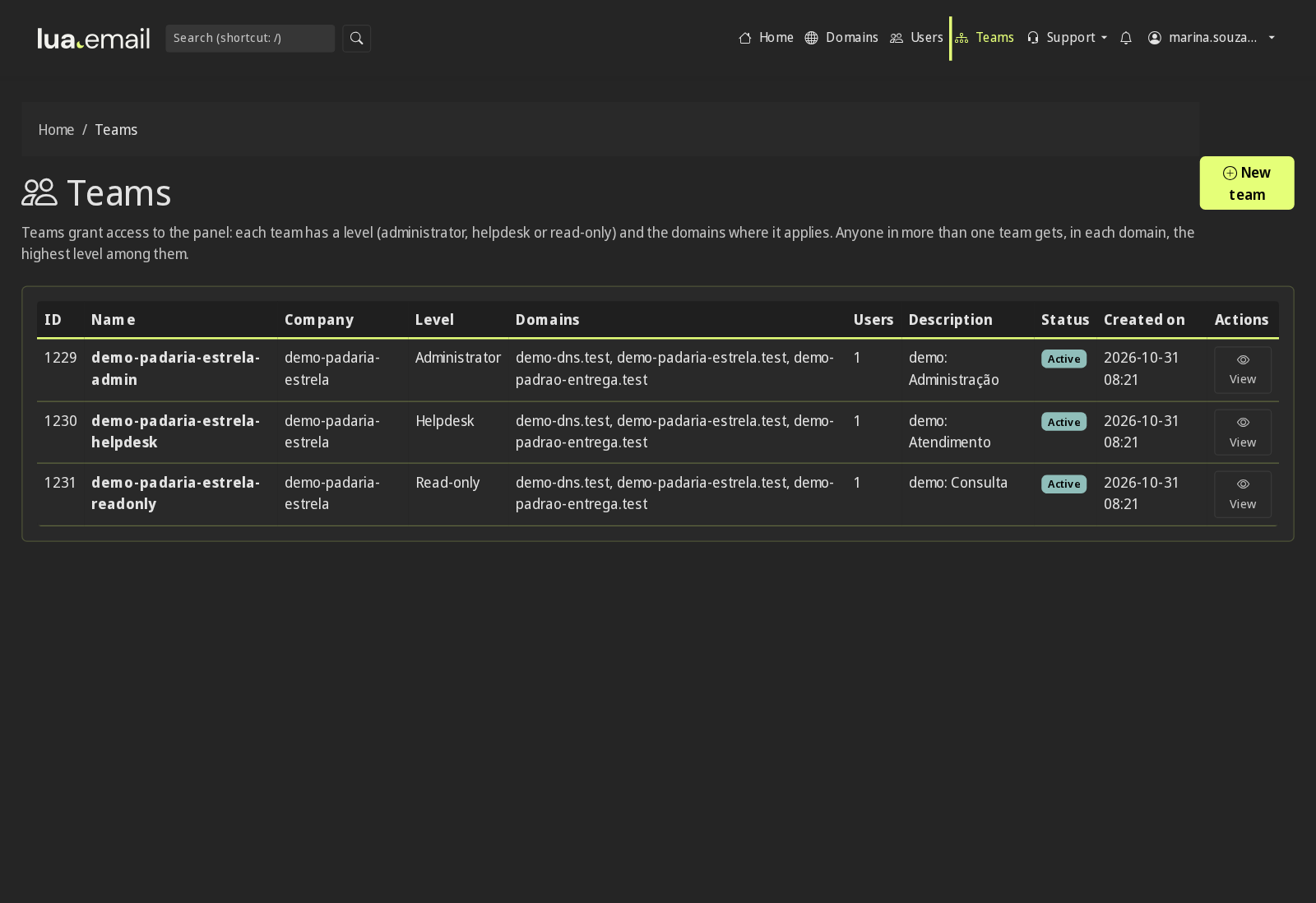
Who administers what, on each domain
In the panel, each person signs in with their own login, and access teams define which domains they can manage and at what level: administrator, helpdesk (password reset only) or read-only.
- The headquarters IT team administers all domains, including those the company opens later
- A branch manager handles only their own domain, without seeing headquarters' domains
- Outsourced IT handles "forgot my password" requests and can't touch DNS, aliases or mailboxes; when the contract ends, you remove the team
- Finance and audit check mailboxes, licenses and logs without being able to change anything
Rules by team, not person by person
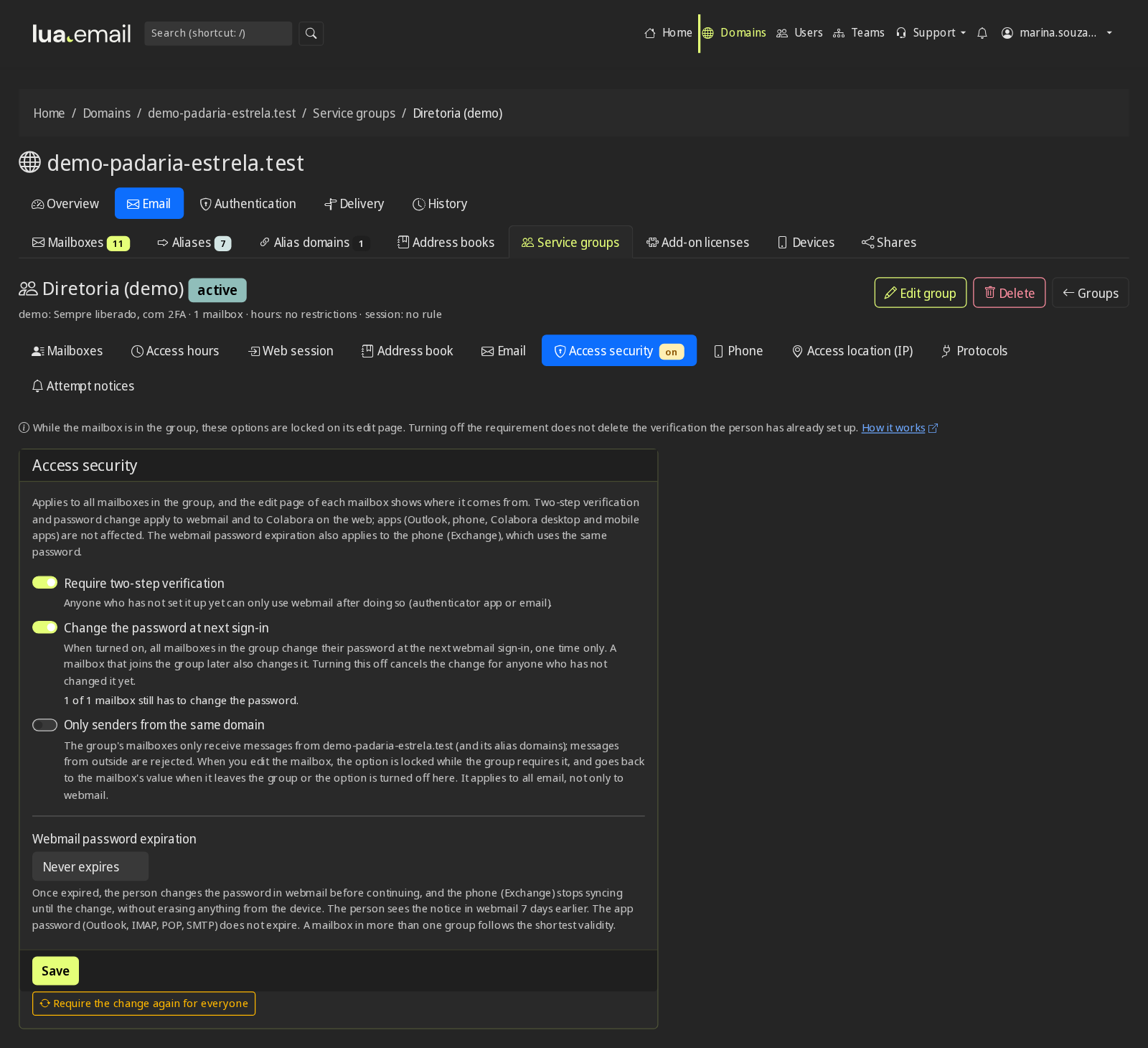
Service groups gather mailboxes, like the construction crew or the sales team, and apply rules to all of them at once. A mailbox in more than one group follows the strictest rule.
- Access hours: the field team can't sign in to email at night, on weekends or on the domain's holidays
- Access location by IP: headquarters, branches and the VPN get in; webmail, Colabora, chat and phones block everything else
- Webmail-only group: the group's mailboxes have no IMAP, POP or SMTP in apps
- Browser session length and whether the person can use "stay signed in"
- Two-step verification and password change required at first sign-in
- Address book and one email that delivers to the whole group
- Internal addresses: everyone@ and announcements@ only receive from people on the domain
- Create many mailboxes at once, from a spreadsheet
Security and control, set once per group
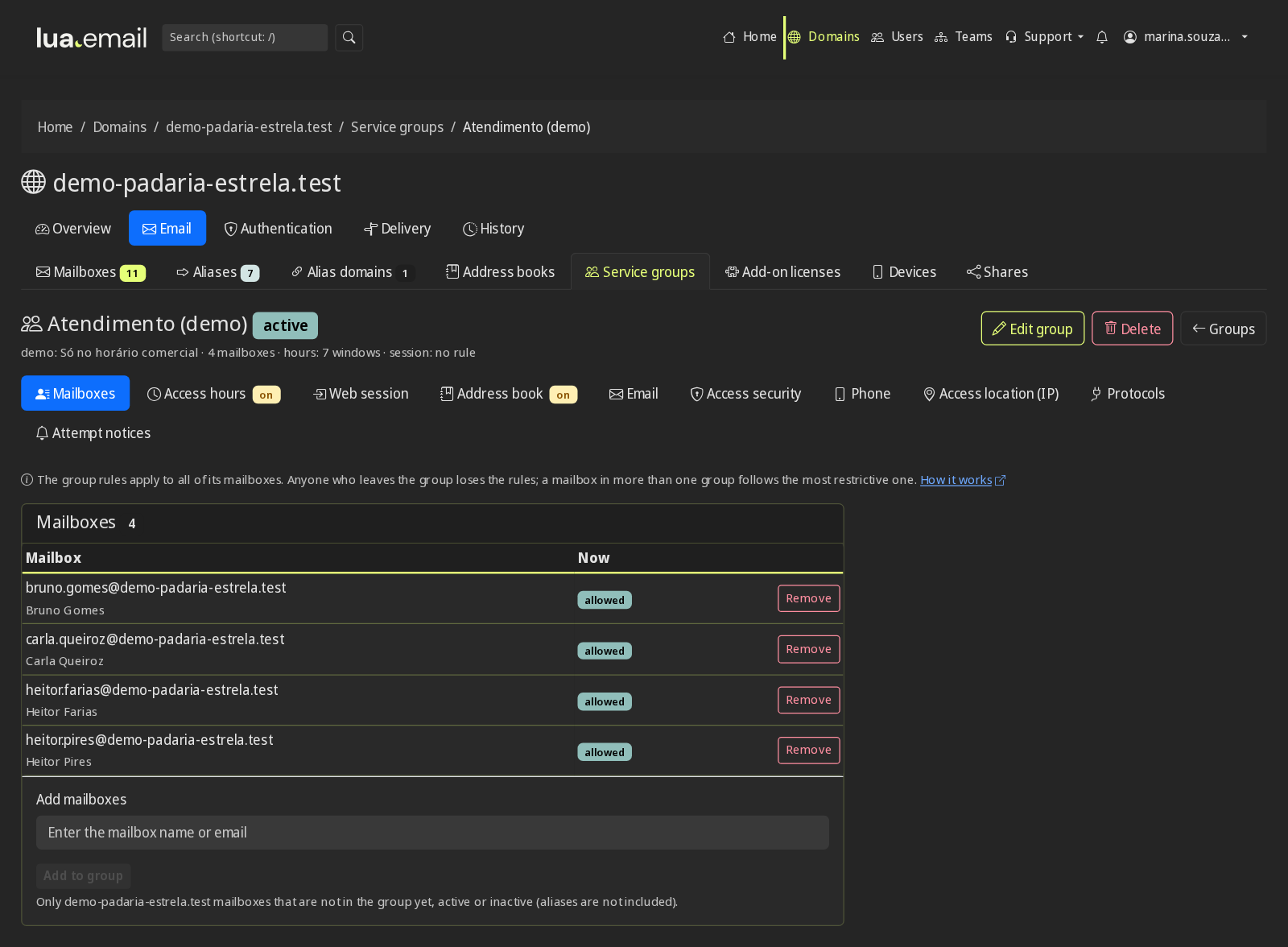
For IT, compliance and whoever is responsible for LGPD (Brazil's data protection law) at the company. Rules live in the panel's service groups: the Default group applies to the whole domain, each group can tighten the rule for its team, and a mailbox that joins a group already follows what is set. With no rule in the group, the domain default applies. If a mailbox is in more than one group, the strictest rule applies.
Who gets in, when and from where
Two-step verification required by group
Management, finance or the whole domain must register the code, in an app or by email, with recovery codes. Nobody depends on each person remembering to turn it on, and with the requirement on, people can't remove their last method in webmail. See how it works
Password expiration and change
Webmail password expiration from 30 to 360 days per group, with a forced change at next sign-in to a temporary password. In the 7 days before expiry, the person sees a daily notice in webmail and Colabora, and the report separates expired and about-to-expire passwords, in a spreadsheet (CSV). See how it works
Access hours and holidays
Outside business hours and on the domain's holidays, the group can't sign in to webmail, Colabora, an email app or the phone. Email keeps arriving. See how it works
Access location by IP
One list with headquarters, branches and the VPN applies to webmail, Colabora, chat and phones with an Exchange account, per group or for the whole domain. Admins are never locked out of the panel. See how it works
Webmail-only group
No Outlook, IMAP, POP or SMTP for the group's mailboxes, and the panel refuses to generate the app password. Webmail and Colabora keep working normally, and email keeps arriving. See how it works
Web session timeout
After the number of hours the company chooses, webmail and Colabora ask for the password again, and the group can go without "stay signed in" on a shared computer. See how it works
Phones under control
On the Exchange account, the group can require a screen lock on the device. The device list shows every connected phone and app, with last access and IP, so you can remove the one belonging to someone who left. See in the manual
Separate app password
Outlook and phones over IMAP use a different password, generated by the panel. If it leaks, webmail stays protected, and you can block app access for a mailbox. See in the manual
What comes in and what goes out
Internal-only addresses
Mailboxes, aliases and groups like everyone@ and announcements@ receive only from senders on your domain. Anything from outside is refused on arrival. See how it works
DKIM, DMARC and antispam
Authentication records are generated and checked in the panel, so nobody can send scams in your company's name. The antispam is 99.91% accurate, measured by users' own corrections. See how it works
Secure link for sharing passwords
The new password goes through a link that expires, without sitting in email or WhatsApp history. The panel records who generated the link, never the password. See in the manual
Message deleted by mistake
With the recovery add-on, people restore from the Trash what they deleted, for 7 days, and the message goes back to its original folder. See how it works
What gets logged for audit
180-day tracing and failed logins
Every message with the path to the mailbox or the reason for refusal, in plain language. Failed logins appear with the account, the reason, the source IP, how many times and when. See how it works
Panel logs
Who changed a password, created a mailbox or changed a rule, and when. Each person signs in to the panel with their own login, so the record has a name. See in the manual
Blocked attempts, with notification
Anyone who entered the right password and was blocked by location or time generates a summary in the panel's bell or by email, and the history keeps 90 days, with the account, the service and the IP. See in the manual
Support access with a reason
To resolve a ticket, the mailbox's webmail opens without asking for anyone's password, with a 30-minute limit, a required reason and a record of who did it, when and on which mailbox. See in the manual
Reports for review
The password expiration report comes as a spreadsheet, and a read-only team lets audit check mailboxes, licenses and logs without being able to change anything. See in the manual
How it starts
A conversation with your IT team
Domains, number of mailboxes, who administers what, current providers, access rules and what your operation needs that doesn't exist yet.
The proposal
Volume pricing, migration method, follow-up and, if applicable, the scope and timeline of what we will develop for you.
One group or one branch first
The switch starts with part of the company, so your team can validate before rolling it out to everyone.
Staged migration and cutover
Messages are copied while the company keeps working, DNS switches on the agreed day, and a final copy brings what arrived in the meantime. Our team follows the first few days.
Questions from people with a large account
At how many mailboxes is an account treated as large?
Above 50 mailboxes, we build volume pricing. But what defines the service is the need: a smaller company with many domains, access rules or integrations also talks to us the same way.
Do you already serve companies our size?
Yes. We already have companies using lua.email with hundreds of email accounts, with several domains, access groups and areas administered by different teams.
Do you develop a specific feature for our company?
When the need calls for it, yes. We work through the case with your team, agree on scope and timeline, and build it. Tell us what your operation needs in the very first conversation.
What is support like?
In Brazil, in Portuguese, with the team that runs the service. Administrators open a ticket in the admin panel and follow every reply on the same screen; the standard response time is the next business day, and shorter times go in the proposal, on request.
We have several domains and branches. How does administration work?
Every domain lives in the same panel. With access teams, headquarters IT administers everything, the branch manager handles only their own domain, outsourced IT only resets passwords and finance only views.
Part of our leadership needs to stay on Microsoft 365 or Google. Is that possible?
Yes. With lua Bridge, people who need it stay on Google or Microsoft and the rest of the company comes to lua.email, on the same domain, with our antispam on every account. It can be only during the switch or permanent.
We already have our own email server. Do we need to migrate?
Not necessarily. lua Shield puts our antispam filter in front of your Exchange, Zimbra, cPanel or Postfix, without changing servers.
What is the migration like for a large company?
In stages: assessment, mailboxes with the same addresses, copying messages while the company keeps working in the old email, DNS switch on the agreed day and a final copy. Our team can do it with you, by the hour, or your team uses the admin panel tool, at R$ 2.00 per GB migrated from the source, paid once. You can start with one branch or group.
Can we make email accessible only from the company network?
Yes, with two rules in the same group. The IP list limits webmail, Colabora, chat and phones with an Exchange account to the addresses of your headquarters, branches or VPN. The webmail-only group removes IMAP, POP and SMTP from email apps. The panel stays outside the block. The Drive on your computer, with an app password, follows the IP list and stops syncing outside the allowed addresses, and a phone on mobile data only syncs through a VPN with a fixed IP.
How do we show auditors that the access rules are being followed?
Through the panel: the password expiration report comes as a spreadsheet (CSV), and the logs show who changed a password, created a mailbox or changed a rule, and when. Tracing keeps 180 days of messages and failed logins. Attempts blocked by location or time stay 90 days in the history, and support access is logged with the reason. A read-only team lets audit check everything without changing anything.
What if we want to leave one day?
The data belongs to the company. All messages can be copied over IMAP, with any email app, whenever you want.
Tell us how your operation works
How many domains and mailboxes, where your email is today and what needs to be different. We reply with a proposal for your volume and, if needed, with what we will build for you.
Talk to our team Request a proposalAre you a smaller company? See pricing per mailbox.