Configurable webmail
Each person chooses the theme, light or dark mode, reading by conversation or message by message, the signature and the rules of their own mailbox. More comfort for anyone who uses email all day.

lua.email
Full webmail, calendar and contacts on your phone, folder sharing, recovery of deleted emails, antispam and antivirus, from R$ 8.90 per mailbox. Here is the complete list, with what each one does.
Signing up is online and activation is automatic: pay by PIX and the account is ready in minutes for you to activate your domain. For questions, we answer on WhatsApp.
Six everyday features, on the real webmail and admin panel screens.
For law and accounting firms, clinics, companies with frequent team turnover and anyone who outsources IT: who gets in, when, for how long and what gets logged. Rules are set once per group of mailboxes, in the panel, without configuring person by person.
The company requires finance, management or the whole domain to register the code (app or email), with recovery codes. Admins don't depend on each person remembering to turn it on. See how it works
Webmail password expiration from 30 to 360 days per group, a forced change at next sign-in to a temporary password, and a report of who is about to expire, with spreadsheet. See how it works
A group can't sign in to webmail, Colabora, an email app or the phone outside business hours and on holidays. Email keeps arriving. See how it works
One list with headquarters, branches and the VPN applies to webmail, Colabora, chat and phones with an Exchange account. IMAP, POP and SMTP are handled by the webmail-only group. See how it works
The group's mailboxes have no IMAP, POP or SMTP in apps, while webmail and Colabora keep working normally. Attempts blocked by location or time can notify admins. See how it works
After the number of hours the company chooses, webmail and Colabora ask for the password again, and the group can go without "stay signed in" on a shared computer. See how it works
For the Exchange account, the group can require a screen lock on the device, and the device list shows every connected phone and app, with last access and IP, so you can remove the one belonging to someone who left. See how it works
Outlook and phones over IMAP use a different password, generated by the panel. If it leaks, webmail stays protected, and you can block app access for a mailbox. See how it works
The new password goes through a link that expires in up to 15 days or 7 views, without sitting in email or WhatsApp. The panel records who generated the link, never the password. See how it works
Mailboxes, aliases and groups that only receive from people on your domain. Anything from outside is refused on arrival. See how it works
For each message, the path to the mailbox or the reason for refusal, with a 180-day history. Failed logins appear with the account and the source IP. See how it works
Panel logs show who changed a password, created a mailbox or changed a rule, and when. Accessing webmail as the mailbox, for support, requires a reason and is logged. See how it works
Per-mailbox add-on: people restore on their own, for 7 days, what they deleted by mistake. See how it works
Senders and domains that always get through or are always refused, per domain or per mailbox. See how it works
Moving a message to Spam or out of it trains the filter, in webmail, Outlook and on your phone. See how it works
Authentication records generated and checked in the panel, so nobody can send scams in your company's name, plus the filter that protects every mailbox. See how it works
What your team uses every day, with the address @yourdomain.com. Each feature has its own page, with a step by step, in features.
Each person chooses the theme, light or dark mode, reading by conversation or message by message, the signature and the rules of their own mailbox. More comfort for anyone who uses email all day.
Calendars, contacts, the company directory and the global catalogs sync with phones, Outlook and other apps. The team sees the same information everywhere.
All the mailboxes and groups on the domain join the Directory, the global address list, automatically, with suggestions as you type in the To field. Besides it, there are global catalogs (sales, support, partners) managed by the administrator. Everything syncs via CardDAV, read-only. See screens How it works
Several people access the same mailbox. It works for support, sales and any role where nobody can miss a message. How it works
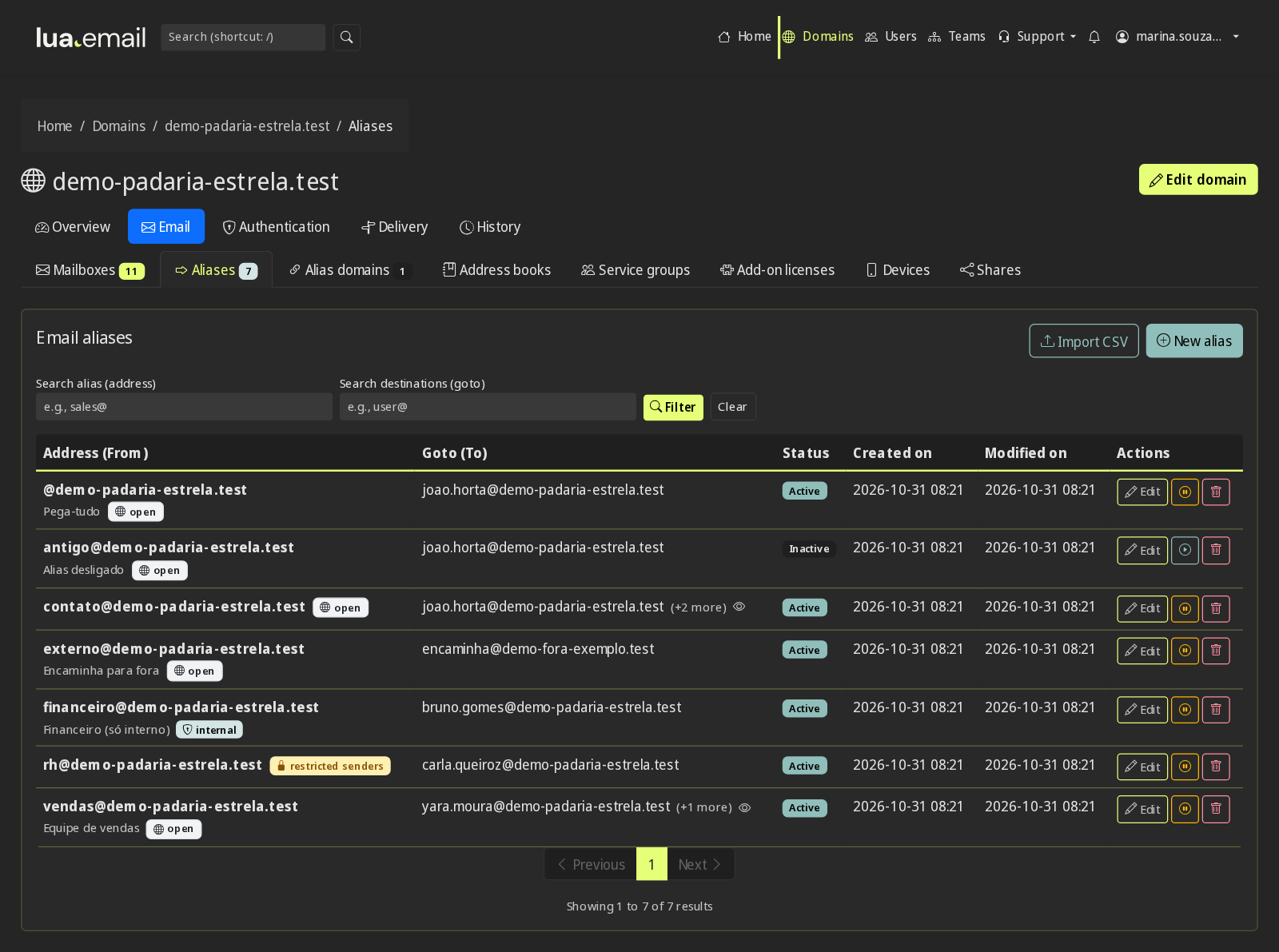
Create addresses like sales@ or finance@ that reach the right mailbox or the whole team, at no extra cost. Mark a mailbox, an alias or a group as internal and it only receives messages from your domain: anything from outside is rejected on arrival. See what it looks like Aliases and groups Internal addresses
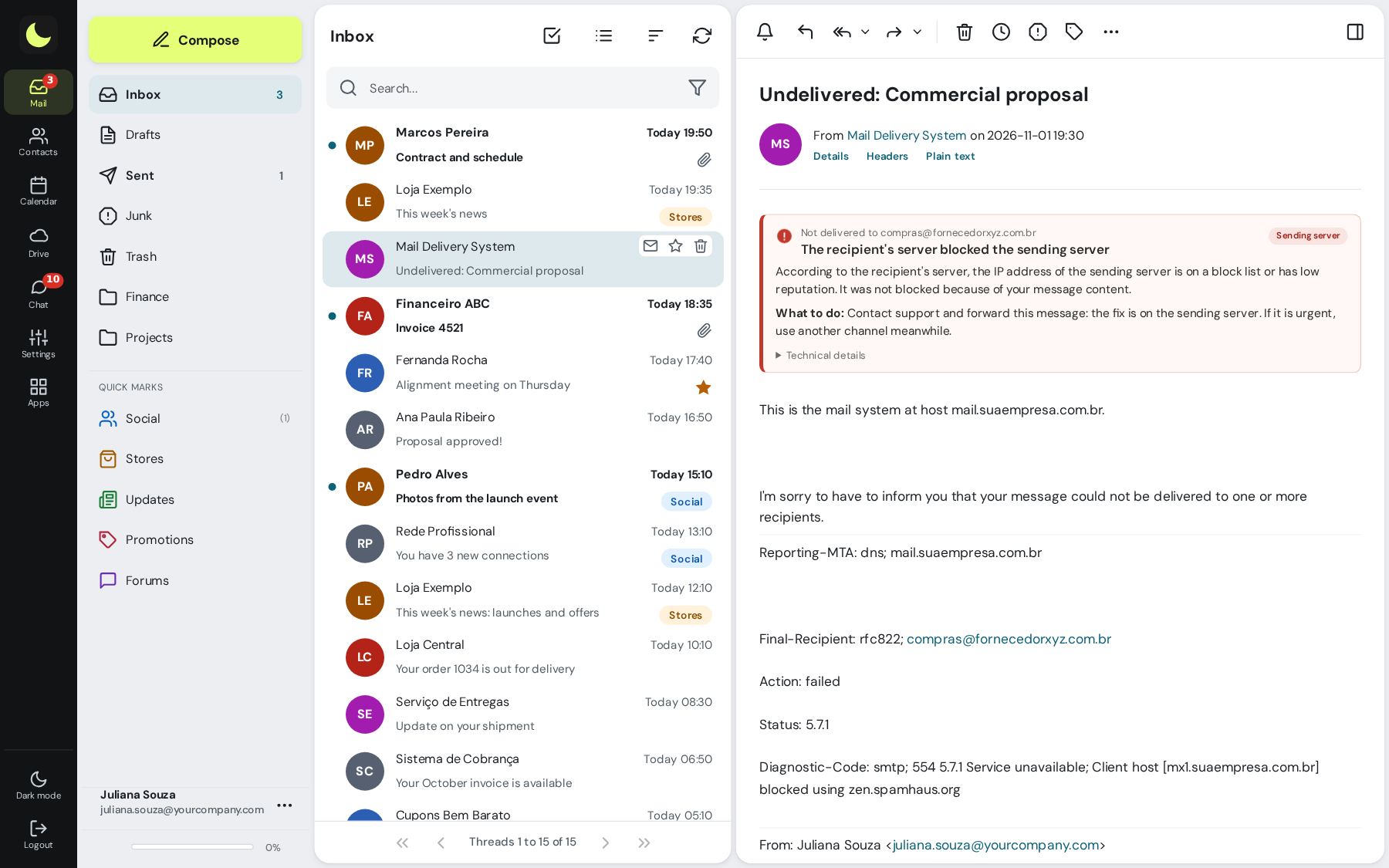
Email bounced? Instead of a code like "550 5.1.1", the "Not delivered" notice tells you the reason in plain language (nonexistent address, full mailbox, blocked by the destination) and what to do. In webmail, in Outlook and on your phone. See what it looks like How it works
Sending limits protect your domain's reputation, so your messages are not blocked because of abuse by another account.
Use the app you prefer (Outlook, Thunderbird, the phone app) with the standard protocols.
On iPhone and Android, the mailbox is added as an Exchange account: email, calendar, contacts and company Directory search in a single account, with new messages arriving instantly. All you need is your email address and password. The auto-reply and Colabora tasks come along, and the administrator sets the screen lock and removes devices in the admin panel. What works on each device How to set up How it works
Forward messages automatically, organize them into folders and automate what reaches the mailbox, without dragging messages around. How it works
Bring accounts and history from your current provider, with our tool in the admin panel (R$ 2.00 per GB migrated, paid once), or with our team (by the hour). How it works
lua.email webmail does more than read and send. These features come ready to use, right in the browser, with nothing to install. See the screens on the webmail page and the step by step in the manual.
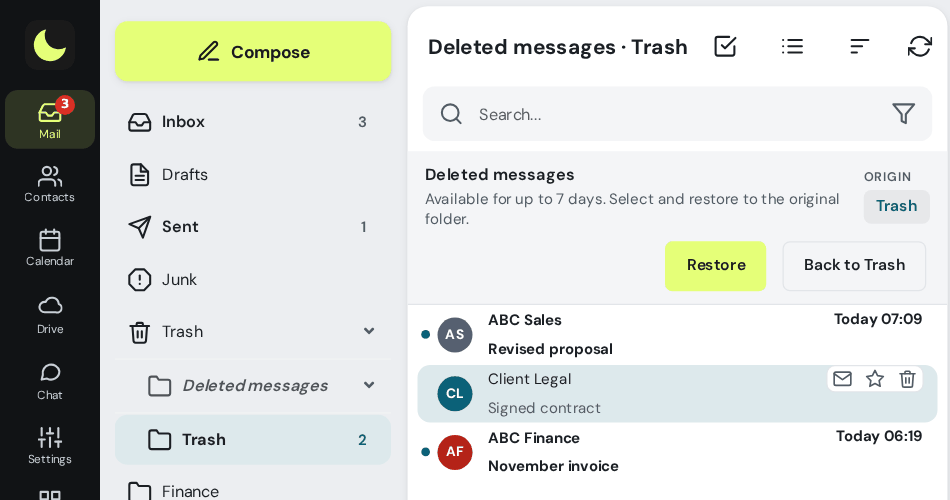
Deleted for good, even by emptying Trash or from a phone? With the recovery add-on, the message is kept for 7 days and users restore it themselves to its original folder or to another folder, without opening a ticket. See the screen How it works
Give a coworker access to a folder or to the whole mailbox, without sharing the password. You decide whether they can read, save or delete, and you remove access whenever you like. How it works
Moved something to Spam or took it out? The filter learns from every classification, in webmail, in Outlook or on your phone. The more the team uses it, the less junk arrives.
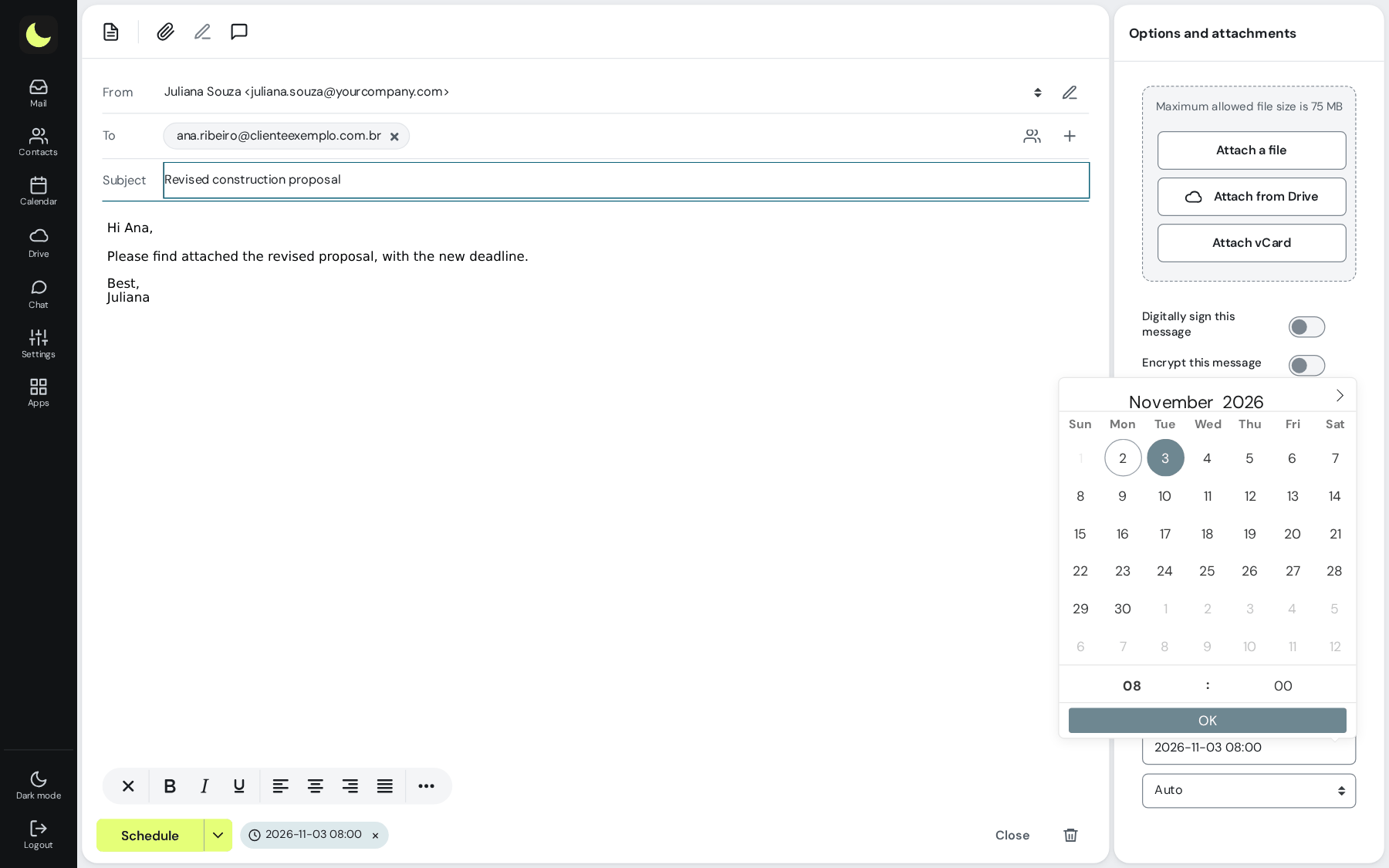
Write now and pick the send time: the message goes out at the right moment, even with your computer off. How it works
Sent it without the attachment? You have a few seconds to click Undo and the message comes back for you to fix. The countdown keeps running even if you switch screens or close the tab. How it works
Cannot deal with it now? Snooze it until later, tomorrow or any date you like. At the right time the message returns to the Inbox as unread. How it works
Two clicks create the rule: everything that arrives from that address goes straight to the folder you chose, including what is already in the mailbox. How it works
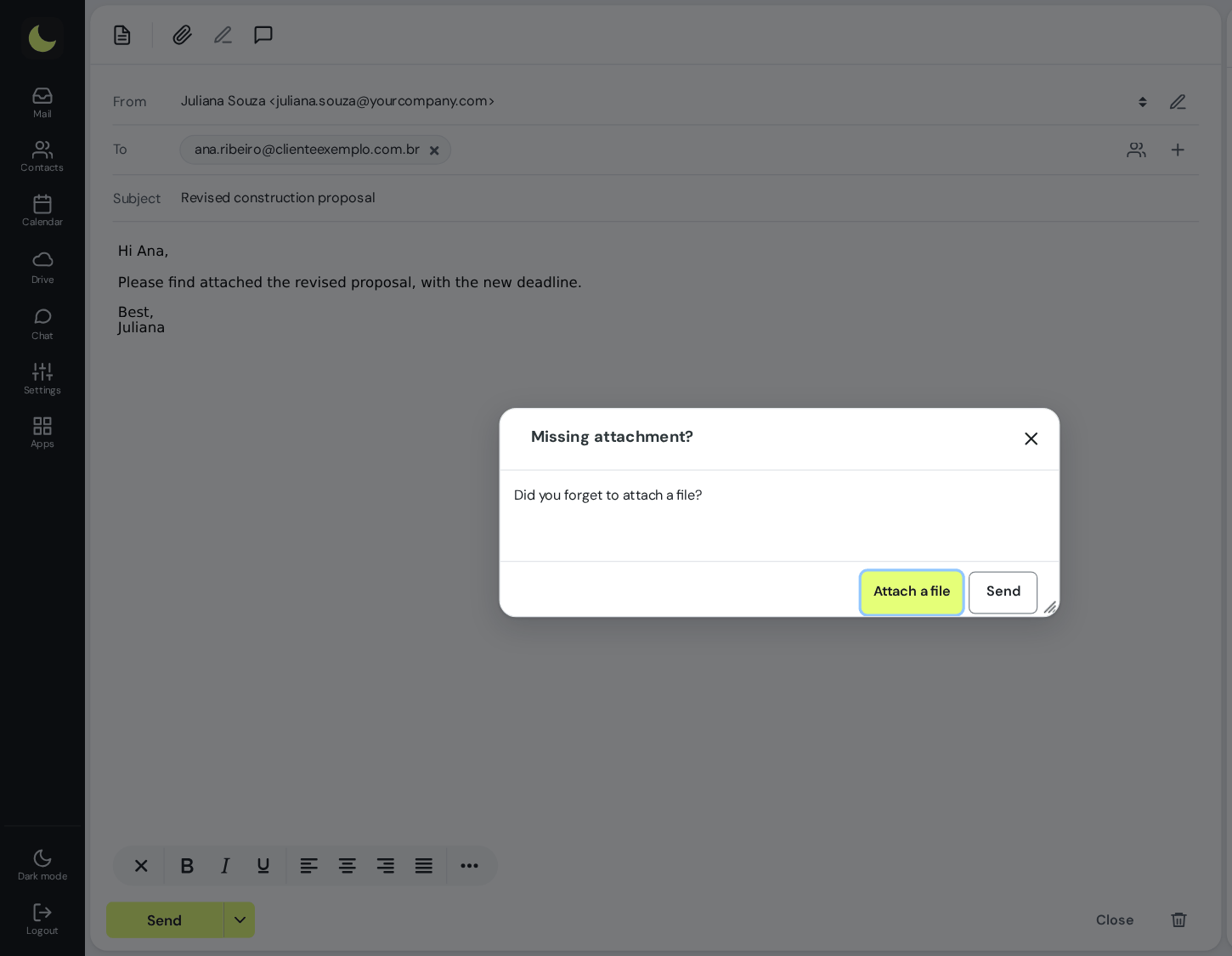
Wrote "see attached" and forgot the file? Webmail warns you before sending.
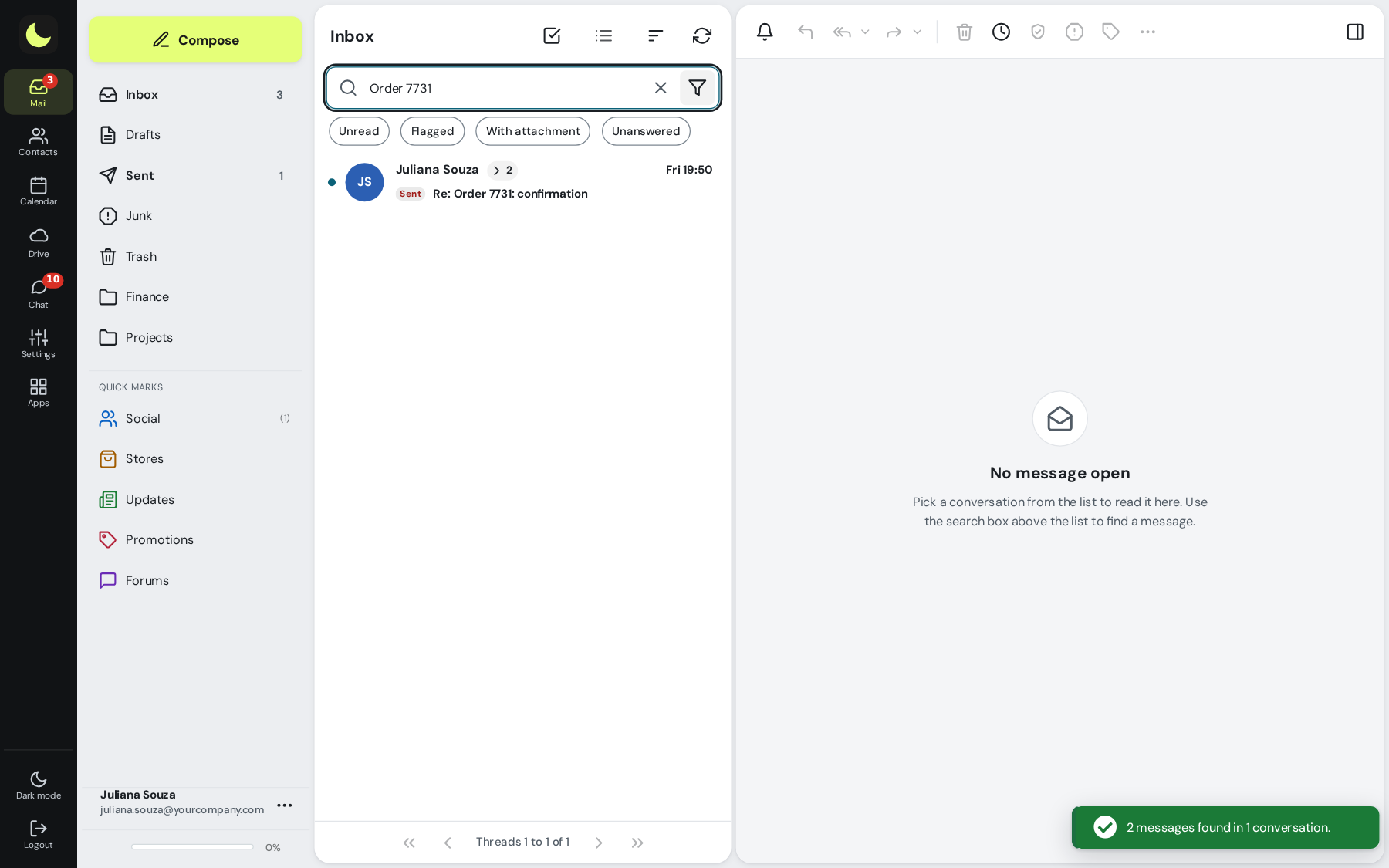
Replies on the same subject stay together, in order. You can follow a whole negotiation without hunting for messages.
Social, Stores, Promotions, Updates and Forums kept apart from the Inbox, with folders and filters ready in one click. How it works
See every newsletter that arrives and unsubscribe from the ones you no longer want in one click, without hunting for the link in the footer. How it works
Find any message with shortcuts like de:, assunto:, tem:anexo and desde:30d, in the current folder or in all of them. How it works
Create appointments, invite people and reply to invitations. When a guest replies, the calendar already shows whether they are coming, without opening the email. Everything syncs to your phone and Outlook. How it works Meeting minutes
Each person chooses the look they are used to, with light and dark modes. Switching providers gets much easier for the team.
Webmail at your company's address, like webmail.yourcompany.com, with your logo and brand colors on the sign-in page and the screens. An optional feature: talk to our sales team. See how to prepare the logo. For resellers: reseller program with your brand.
With the same login as your email and at no extra cost, your team works together in the browser. See the screens on the lua Colabora page.
Team folders, sharing with coworkers and links with a password and expiration date for customers. See the screens How it works
Browser editor for Word, Excel and PowerPoint files, with several people editing at the same time. See the screens How it works
A large file becomes a link automatically, attachments come from Drive and received attachments go there in one click. Drive and Chat notices appear in webmail, and new email appears on the Drive bell. See the screens Large files by email
Team conversations and meetings with outside guests through a link created in the calendar event. See the screens Business chat Meetings
Tasks with due dates that show up in webmail, project boards, drawing together and notes. See the screens How it works
Emails and files share the plan's storage, with the same login, and only your team appears. See the screens
lua.email features for those who host their mailbox with us: more control over who signs in, when and for how long.
An extra layer of protection in webmail: besides the password, a second factor confirms that it is really you signing in to the account. How it works
Separate passwords for webmail, SMTP, IMAP and POP. If one app's password leaks, webmail stays protected.
Sending authentication set up in the admin panel, with DNS records ready to copy and validate. It gets harder for someone to run a scam in your company's name. How it works
Follow sends, receipts and the usage of each mailbox, so you know what is happening with your company's email.
Set the hours when a group of mailboxes cannot sign in: webmail, Colabora, email app and phone. The person sees the reason, anyone signed in is logged out and email keeps arriving. National holidays with one click. See what it looks like How it works
Limit webmail, Colabora, chat and phones to your company's IPs, and remove IMAP, POP and SMTP from email apps for a group of mailboxes. See how it works
After the number of hours you choose, webmail and Colabora ask for the password again. You can also stop the group from using "stay signed in" on a shared computer.
Give more people access to the panel without handing over everything: administrator, helpdesk (only changes mailbox passwords) or read-only. The restriction applies to the API too.
"The customer did not receive it." Search by address and see each step of the message: accepted, delivered, rejected by the destination (with the reason) or still queued. Records are kept for 180 days. How it works
Send a password through a link that expires after the time you choose (up to 30 days) or after the number of views (up to 20), whichever comes first. The recipient can delete the link right away, and the password can require a secret phrase. How it works
In every product
Antispam, antivirus and sender controls are in lua.email, lua Bridge and lua Shield, each at the right point along the message's path. How the antispam works
99.91% accuracy, measured by users' own corrections, and over 1 billion messages analyzed. Reputation, SPF, DKIM, DMARC, links and content checked on every message, with a neural network AI, our own blocklists and spamtraps. How it works
Attachments scanned before reaching the inbox, and outgoing messages with viruses stopped on the way out. In lua Colabora, files also go through the antivirus.
Trusted or blocked senders and domains, for the whole domain or for a single mailbox. The important supplier always gets through, and whoever bothers you never does.
Infrastructure prepared so your emails reach your customers' inboxes, without landing in spam because of a technical failure.
For those coming from Google Workspace, Microsoft 365 (formerly Office 365), Zoho Mail or Zimbra, lua.email provides email, webmail, calendar, contacts and lua Colabora (files, documents, chat and tasks), priced per mailbox starting at R$ 8.90 per month. Migration is done by our team or with the admin panel tool, and support is in Brazil, in Portuguese.
Email, calendar, contacts, files, documents and chat with one sign-in, starting at R$ 8.90 per mailbox. Messages come over with the admin panel tool or with our team, and your addresses stay the same. See the Google Workspace alternative
Each mailbox includes webmail, shared calendar and contacts, an Exchange account on mobile, and lua Colabora. Our team arranges the migration with you, and your addresses stay the same. See the Microsoft 365 alternative or compare features and pricing
Messages come over IMAP, with the admin panel tool, which shows what will be copied before you start, or with our team, if you prefer. Each mailbox includes webmail, calendar, contacts and lua Colabora, with support in Portuguese. See the Zoho Mail alternative
Our team takes care of the server, antispam and backup, and your company uses webmail, calendar, contacts and lua Colabora in every mailbox. Messages come over IMAP, with the admin panel tool, or with our team. See the Zimbra alternative
Yes. For those coming from Google Workspace, Microsoft 365 (formerly Office 365), Zoho Mail or Zimbra, lua.email provides email, webmail, calendar, contacts and lua Colabora starting at R$ 8.90 per mailbox per month, with migration by our team or with the admin panel tool, and support in Brazil, in Portuguese. See the alternatives
Yes, with the recovery add-on. Whatever is permanently deleted, including by emptying Trash or deleting through Outlook or from a phone, is kept for 7 days. Users restore it themselves in webmail, in a few clicks.
Yes. In Settings → Folders you share a folder or the whole mailbox with another mailbox in the company and choose the permissions: read, save or delete. It also works in Outlook, Thunderbird and on phones.
lua.email costs from R$ 8.90 per mailbox, versus over R$ 30 per user on Google Workspace and Microsoft 365, and it brings what matters in email: antispam, recovery, sharing, an admin panel with DKIM and DMARC, and human support. See the full comparison.
You get a notice with the subject "Not delivered: ..." and an explanation in Portuguese of the reason, such as a nonexistent address, full mailbox or block by the destination, and of what to do. The explanation appears in webmail, Outlook and on the phone; the technical details stay in the message.
Yes. A mailbox, an alias or a group can be marked as internal: it only receives messages from your own domain. Outside messages are rejected on arrival and the sender is told the address is for internal use.
We apply sending limits to protect the reputation of your domain and of all customers. They do not get in the way of daily use and exist so your messages keep arriving. For larger legitimate volumes, contact us.
It is a mailbox that several people on the team access together, like support@ or sales@. It works for teams that need to reply from the same address without losing messages.
They are the company's contact lists (for example Sales, Support or Partners), maintained by the admins and synced to the whole team via CardDAV. They appear in webmail and on the phone as read-only; to change a contact, talk to whoever manages the address book.
Yes. lua.email, lua Bridge and lua Shield all have antispam and antivirus, plus allowed and blocked senders lists. In Shield, filtering happens at the entrance, before the email reaches your server.
Yes. The mailbox works over POP3, IMAP and SMTP. On iPhone and Android, the mailbox can also be added as an Exchange account, with email, calendar and contacts together. Calendars and contacts also sync over CalDAV and CardDAV with Outlook and other apps.
In webmail, you turn on 2FA to require a second factor besides the password. You can also use independent passwords for SMTP, IMAP and POP. If one leaks, the others stay safe.
Fixed price per mailbox, billed monthly, with no separate fee. The invoice doesn't change from one month to the next: you pay for the storage of each mailbox.
Price per mailbox, billed monthly
Video meetings have a separate license, R$ 3.00 per mailbox, per month. Chat, files, documents, calendar and the rest of lua Colabora are included on all plans.
Need larger volumes or want to combine different plans on the same domain? Talk to us and we'll put together the combination for your team.
A neural network, our own blocklists tuned to our traffic, spamtraps and antivirus stop scams, phishing and viruses before the inbox, with 99.91% accuracy measured by user corrections.
The features on this page come with every lua.email plan, and if you pay by PIX the account is ready in minutes. Recovery of deleted emails is a per-mailbox add-on, and webmail with your brand is optional: talk to our sales team.
Subscribe now See pricing See the comparisonPrefer that our team contacts you? Leave your contact details