How do I migrate email from one provider to another without losing messages?
Copy the messages before you move the domain, and copy again afterwards. With lua.email, the first copy happens while your team still uses the old email. On the agreed day, the domain moves to lua.email (the MX switch) and the Sync again button brings over whatever still reached the old provider. You can do it with our tool, in the panel, or ask our team to do it with you.
How much does email migration cost?
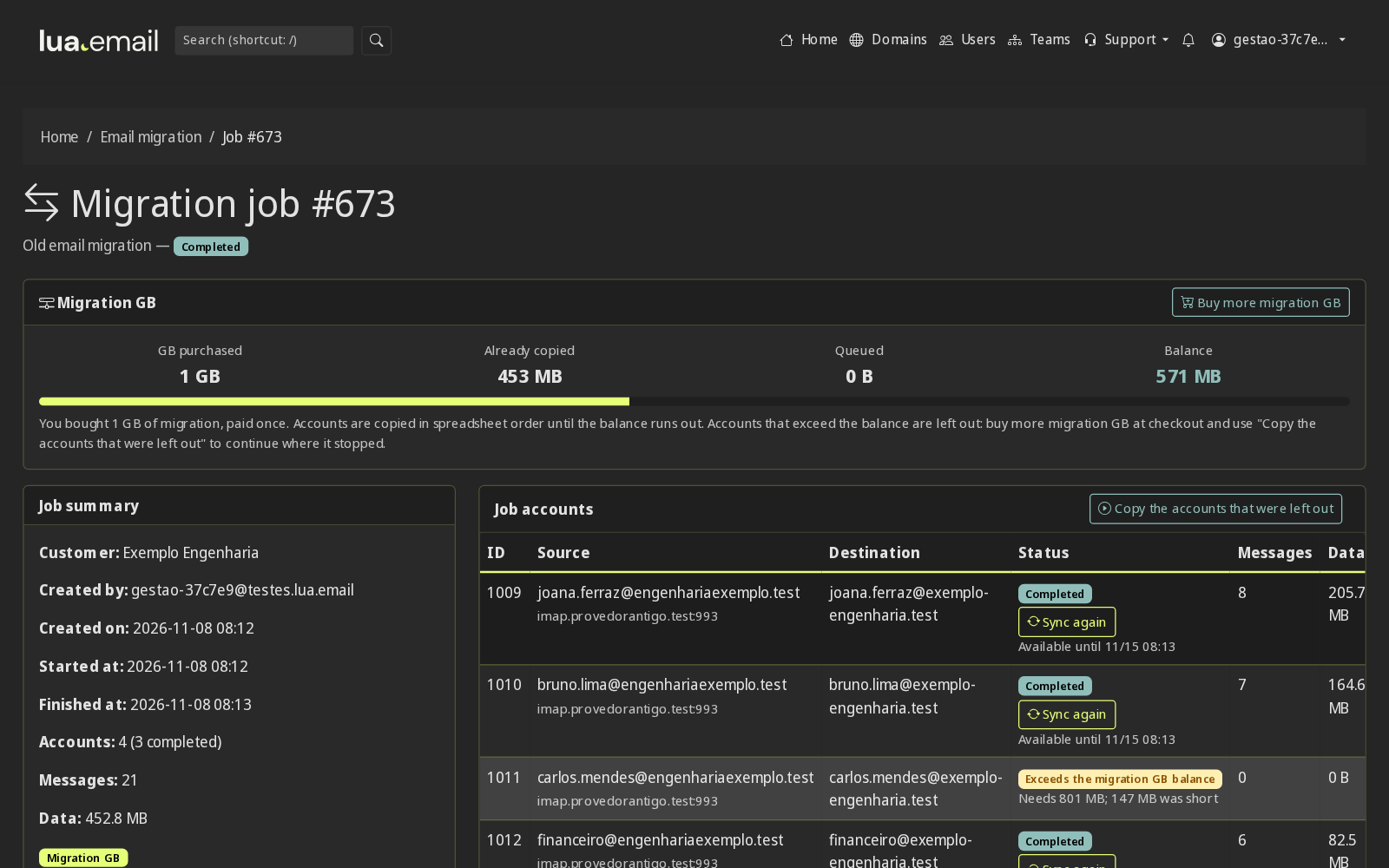
With the admin panel tool, R$ 2.00 per GB migrated from the source, paid once. You buy the expected migration GB at the lua.email checkout, and they become a balance in the admin panel. The preview shows what will be copied with those GB before you start. If you sync again after the MX switch, what comes in is taken from the balance. Short? Buy more migration GB, which are added to the balance, and copy the accounts left out. Done by our support team, the migration is billed by the hour, with the price on request.
How many migration GB should I buy?
Estimate the size of the mailboxes at the old provider and buy that many migration GB at the lua.email checkout (R$ 2.00 per GB migrated from the source, paid once). The admin panel preview measures each account for real and shows what will be copied. If you run short, just buy more, and it is added to the balance.
What if the accounts exceed the migration GB balance?
Accounts go in spreadsheet order until the migration GB run out. The accounts left out stay on record in the task, with their size and how much is missing, and nothing is deleted. Buy more migration GB at the checkout and click Copy the accounts left out: they go back into the queue and use the new balance.
Will I be without email during the migration?
No. Your team keeps using the old email while the first copy runs. Email only moves on the day of the MX switch, and Sync again brings over what reached the old provider in the following hours.
How do I migrate from Gmail or Google Workspace?
With the tool, using the server imap.gmail.com on port 993. IMAP must be turned on in the account and, if it has two-step verification, use a Google app password instead of the regular password. Review the case first: Gmail labels arrive as folders, and a message with several labels may be copied to more than one folder, which increases the volume (GB) and uses more of the migration GB. The preview shows the size before you start, and we recommend talking to our team to review your Gmail or Google Workspace account before migrating.
Can I migrate from Microsoft 365 or Outlook.com?
Yes, with our team. These accounts use a different type of authentication that the admin panel tool does not support yet, so the migration from Microsoft 365 (formerly Office 365) and Outlook.com is done by our team. Contact us to schedule the date and plan the steps.
How do I migrate from Locaweb, HostGator, KingHost or a server with cPanel?
With the tool, using the hosting provider's IMAP address, which appears in the provider's panel or in the instructions for setting up Outlook. It is almost always port 993 with SSL. The preview tests the login of each account before any copy.
Who does the migration, me or you?
You choose. With the tool, the company administrator, the reseller or the IT partner does it in the panel, with a spreadsheet. Or our team plans, migrates and checks with you.
How long does it take?
It depends on how many accounts there are and how much email each one has. With the tool, the copy starts within moments and the screen shows live the folder, the messages copied, the speed and an estimate of the time left. With our team, we agree on dates after looking at your case.
Do contacts and calendar come along?
The copy brings messages and folders. With the tool, contacts and calendar come by file: export contacts as vCard or CSV and the calendar as .ics from the old provider, and import them into the lua.email webmail. With our team, migrating contacts and calendar is on request: we do it when the old provider allows some access to them.
Do I need the password of each old account?
Yes, the email address and password of each account at the old provider. If someone does not want to share their password, they can change it to a temporary one just for the migration. The password is kept encrypted and is deleted when the 7-day Sync again period ends.
What about email that arrives after the MX switch?
Until DNS updates, and sometimes for a few hours after, a message can still reach the old provider. Each finished account in the job has a Sync again button, which copies only what arrived since the last copy, without repeating anything and without deleting anything at the old provider.
For how long can I sync again?
For 7 days after the first complete copy of each account. The screen shows the deadline next to the button, and syncing again does not extend it. After that, the old provider password is deleted and the button no longer appears.
Does Sync again charge a second time?
No. Sync again does not create a new charge: what comes in this pass is taken from the balance of the migration GB you bought, paid once at R$ 2.00 per GB. With no balance, just buy more migration GB.
Do I have to stay on the page during the copy?
No. The copy runs on the server. When you return to the job screen, the "What is happening now" panel shows the log, each account's bars and what has already finished.
Do the email addresses change?
No. Mailboxes are created at lua.email with the same addresses you have today. People who write to your company won't notice the change.
What if an account fails?
The account row shows the reason, such as a rejected password or a server that did not respond. Fix it and click Try again on the ones that failed: the copy picks up where it stopped, without duplicating what already arrived. An account that failed does not use the balance beyond what was already copied.
Is there a size limit?
The limit is the space of the destination mailbox. If the quota runs out in the middle of the copy, the account stops with that notice: increase the mailbox space and try again.
How do I request the migration?
Not a customer yet? Talk to sales on WhatsApp +55 47 99276-7511. Already a customer? Write to suporte@lua.email. With the tool, whoever administers the email starts directly in the panel, under Support, Email Migration.
Do I need to reconfigure phones and Outlook?
Yes, once, with the new server. With the domain's Autodiscover and automatic email setup ready, Outlook and phones find the server with just the email address and password. Our team helps whoever needs it.