
Security
Restrict company email by IP and to webmail only
The finance team handles data that shouldn't be opened from just anywhere, and an Outlook set up on a laptop at home takes a copy of the messages outside the company. In the panel, you choose which IPs each group of mailboxes can sign in from and, if you want, keep the group on webmail only, with no email programs.
Signing up is online and activation is automatic: pay by PIX and the account is ready in minutes for you to activate your domain. For questions, we answer on WhatsApp.
- By group or for the whole domain
- 90-day attempt history
- On all plans
How to set it up in the panel
Create a service group, or use the Default one
Under Email → Service groups. The Default group applies to the whole domain, including mailboxes created later.
List the allowed IPs
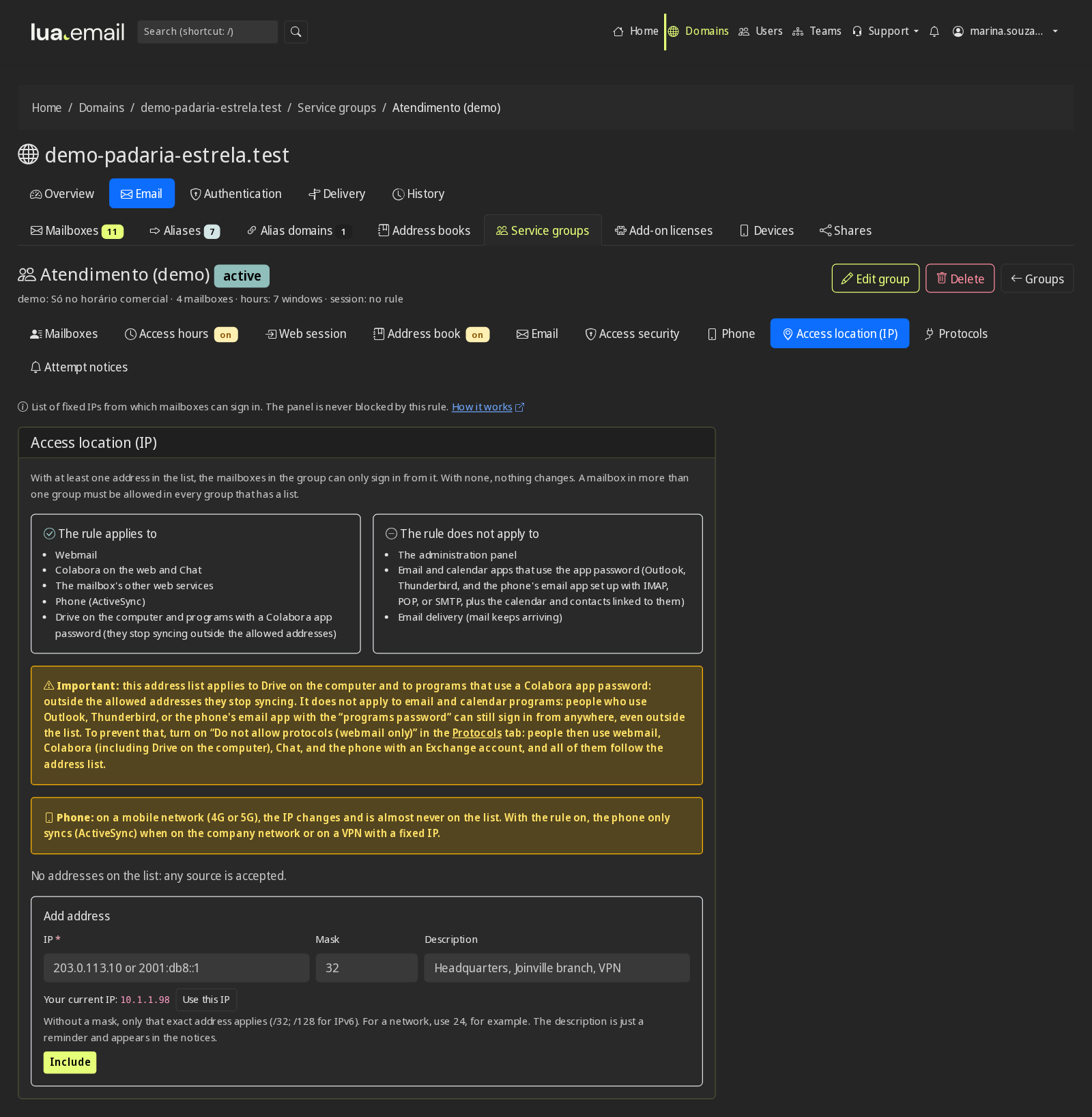
On the Access location (IP) tab, add the IP of your headquarters, branch, or VPN, with a mask and description. The screen shows your current IP and confirms how many mailboxes will only be able to sign in from there.
Keep the group on webmail only, if you need to
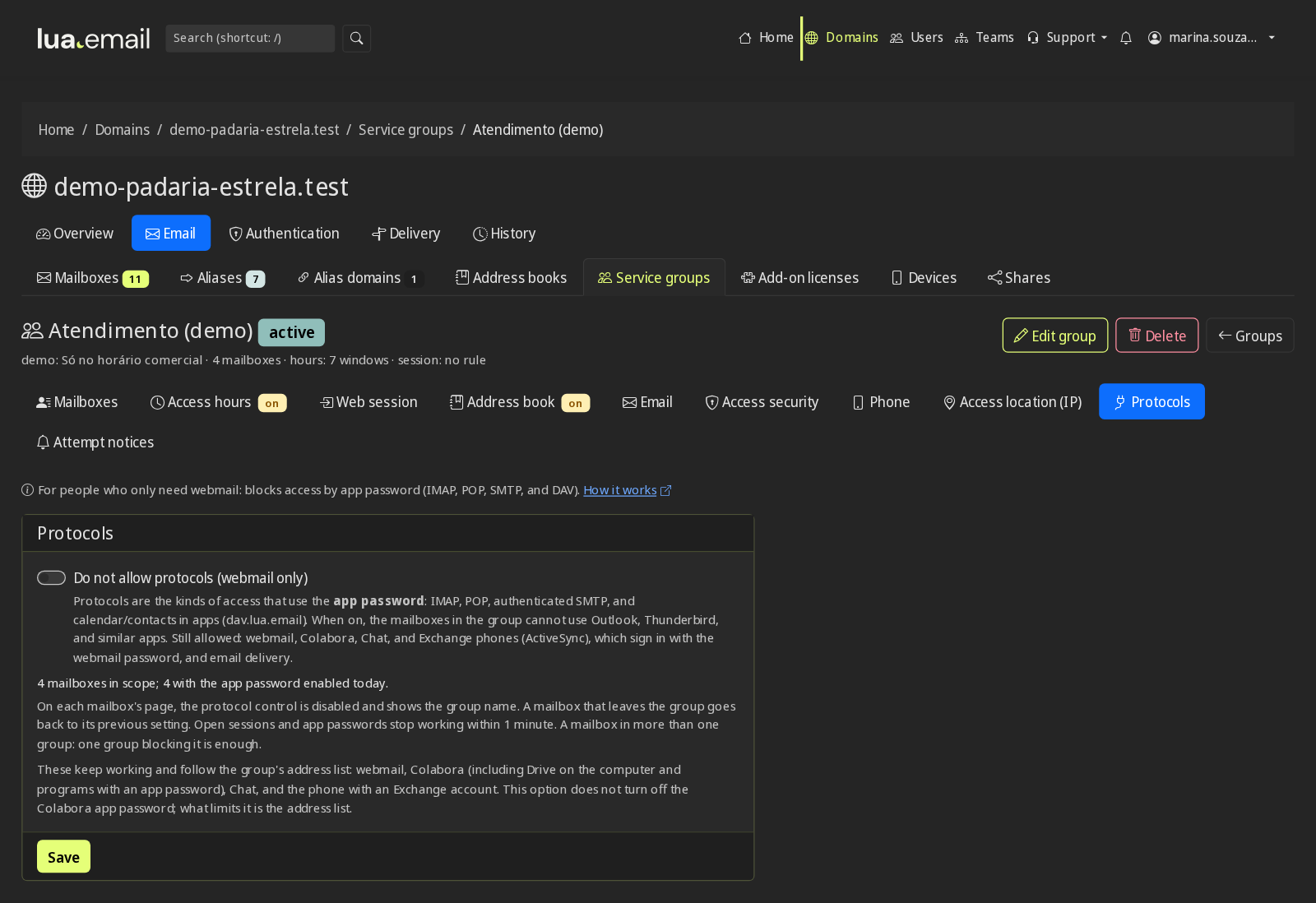
On the Protocols tab, turn on Do not allow protocols (webmail only). The mailboxes lose IMAP, POP, and SMTP in programs.
Choose who gets notified
On the Attempt notices tab, separately for IP and for schedule: no notice, only the panel bell, or also by email.
What the rule covers and what it doesn't
- The IP list applies to: webmail, Colabora on the web, chat (including the phone app), phones with an Exchange account, and Colabora calendar, contacts, and files in programs (CalDAV, CardDAV, and WebDAV) using the account password.
- The IP list does not apply to: Outlook, Thunderbird and the phone email app (IMAP, POP and SMTP with the app password), nor to calendar and contacts with the token (
dav.lua.email). For those, use webmail only. The list does apply to the Drive on your computer and to apps that use a Colabora app password: outside the allowed IPs, they stop syncing. - The panel is never blocked. Administrators don't get locked out, and email delivery doesn't change.
- Phones on mobile networks: on 4G and 5G the IP changes and falls outside the list. With the rule on, the Exchange account only syncs on the company network or on a VPN with a fixed IP.
- Public, fixed IPs only: the rule checks the address the person uses to reach lua.email, and internal addresses, like 192.168.x.x, don't work.
- Webmail only doesn't affect the phone: the Exchange account keeps syncing. To limit the phone, use the IP list in the same group.
- Notices only with the right password: a wrong password doesn't trigger a notice. Repeated attempts become one summary per person, at most one per hour, and the history keeps 90 days. Blocks on IMAP, POP, and SMTP outside allowed hours don't trigger a notice.
- A rule change can take up to 60 seconds to take effect in webmail and Colabora. With no rule at all, nothing changes for anyone.
Questions about IP access and webmail only
With the IP list, can no one sign in over IMAP from outside anymore?
The list doesn't cover IMAP, POP, or SMTP with the app password. To close that path, also turn on webmail only in the same group.
Can the administrator get locked out?
No. The management panel never goes through the list. You can fix the rule from anywhere.
Does the phone keep working?
On the Exchange account, only when it's on the company network or on a VPN with a fixed IP, because on a mobile network the IP changes. Let the team know before you turn it on.
What does the person see when they're blocked?
With the right password, they see Access not allowed from this location. Contact your company's administrator. With the wrong password, they see the normal password error.
Does webmail only also block Colabora?
No. Webmail, Colabora, chat, and the phone's Exchange account sign in with the webmail password and keep working. Email keeps arriving.
Does someone who leaves the group lose their Outlook setup?
No. When a mailbox leaves the group, it goes back to what it had before and can use Outlook with the same app password.
Will I find out about blocked attempts?
If you turn on notices: in the panel bell or by email, for administrators, the person themselves, and one extra email address. The Blocked attempts screen keeps 90 days, with filters by type, service, and mailbox.
Does this cost extra?
No. It's part of the panel, on all plans.
See also
Want this working at your company today?
lua.email costs from R$ 8.90 per mailbox, with webmail and lua Colabora on all plans. Signup is online and activation is automatic: pay by PIX and the account is ready in minutes for you to activate your domain. For questions, we answer on WhatsApp.
Subscribe now See pricing How we migratePrefer that our team contacts you? Leave your contact details