
Security
Password expiration and change by group: the company decides how often
The temporary password that was sent in a message or written on paper is still valid months later, and someone who left the company still remembers it. A law firm, an accounting firm or a clinic needs to show that passwords change from time to time, and administrators cannot go person by person asking. In the admin panel, the rule belongs to the group: you choose the expiration once and it applies to all its mailboxes, including the ones added later.
Signing up is online and activation is automatic: pay by PIX and the account is ready in minutes for you to activate your domain. For questions, we answer on WhatsApp.
- Expiration from 30 to 360 days per group
- Spreadsheet report (CSV)
- On all plans
How to set it up in the panel
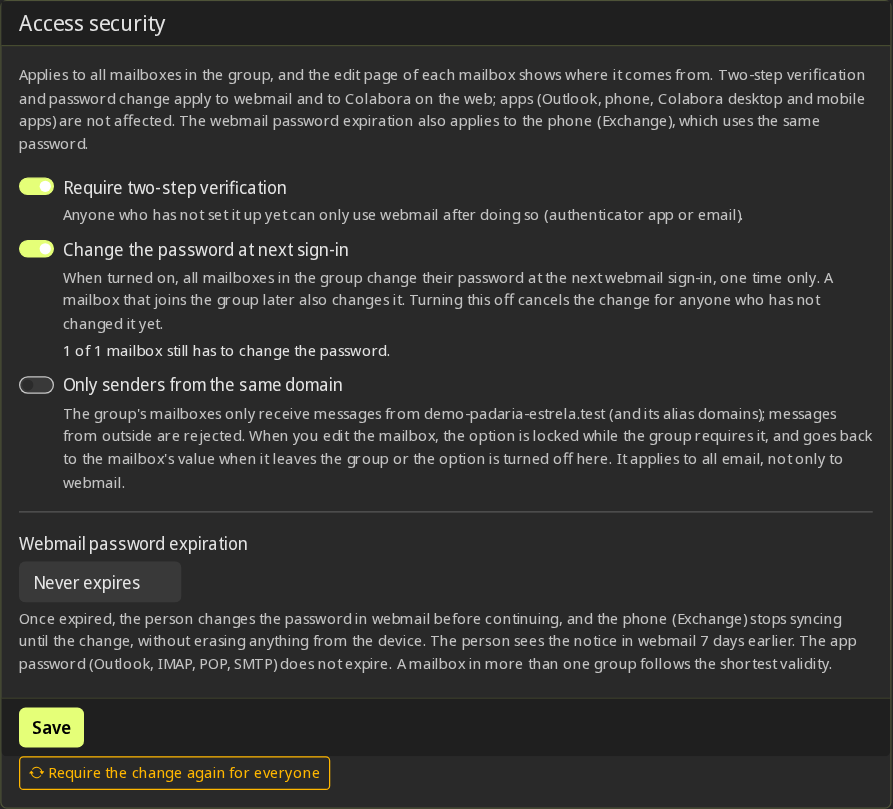
Open the group and the Access security tab
In Email → Service groups. To apply to the whole domain, use the Default group.
Choose the webmail password expiration
Never (the default), 30, 60, 90, 180 or 360 days, counted from the last change.
Ask for a change at next sign-in, if you want
On the same tab, the option Change password at next sign-in marks all the mailboxes in the group. Whoever has changed it, has changed it: the button Reactivate the change for everyone asks again, including from people who already changed.
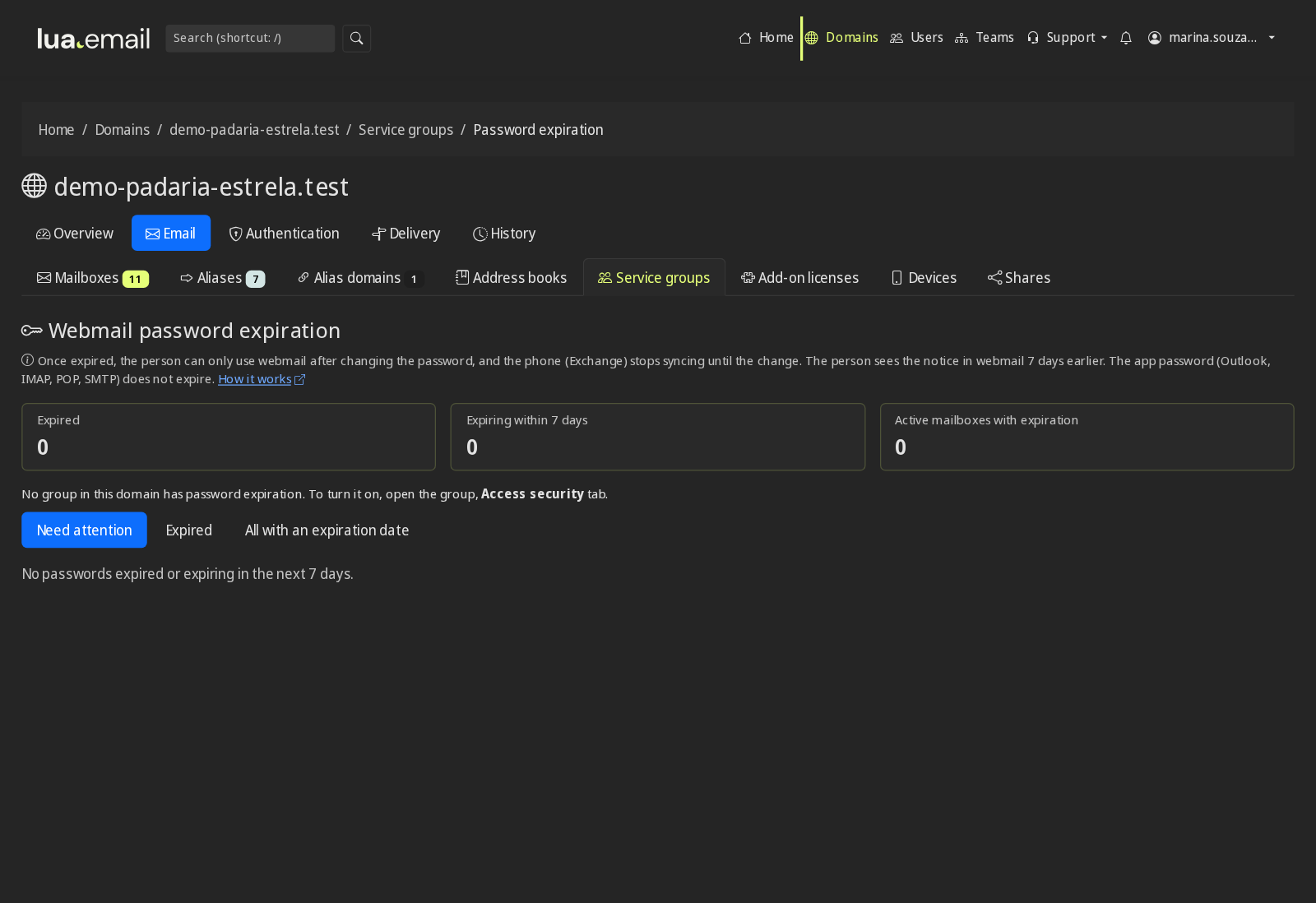
Follow along with the report
The Password expiration button, in the group list, separates expired passwords, those expiring within 7 days and all the others, with a spreadsheet (CSV) to download.
What happens when the password expires
- When you turn on expiration, nobody expires before 7 days: anyone already past the deadline gets that grace period, with a notice.
- Expired password: in webmail and in Colabora on the web, only the new password screen opens until the person changes it.
- A phone with an Exchange account stops syncing until the change. Nothing is deleted from the device; after the change, the person enters the new password on the phone and syncing resumes.
- In the 7 days before expiring, the person gets one notice per day in webmail and in Colabora. The notice does not go by email and has no link, on purpose: the person changes the password by signing in to webmail as usual.
- The administrator is notified through the panel's bell, once per domain and per expiration date.
- If the mailbox is in more than one group, the shortest expiration applies.
- The app password (Outlook, IMAP, POP and SMTP) does not expire. The expiration applies to the webmail password and, through it, to phones with an Exchange account.
- On each mailbox's page, the Webmail box shows when the password was changed, when it expires and which group sets the rule.
Questions about password expiration and change
What expiration options are there?
Never, 30, 60, 90, 180 or 360 days. The default is never, and nothing changes until someone turns it on.
Can someone lose access by surprise?
No. When you turn it on or change the expiration, nobody expires before 7 days, and the person gets one notice per day in the 7 days before it expires.
Does the person get an email notice?
No. The notice appears in webmail and in Colabora. An email asking you to click and change your password is the most common scam template, so lua.email does not send that email.
What about phones?
A phone with an Exchange account stops syncing until the person changes the password in webmail. Nothing is deleted from the device.
Does the Outlook password expire too?
No. The app password (IMAP, POP and SMTP) is separate from the webmail password and has no expiration.
Can I see who has an expired password?
Yes. The Password expiration report lists expired ones, those expiring within 7 days and all of them, with a spreadsheet to download.
Does this cost extra?
No. It's part of the panel, on all plans.
See also
Want this working at your company today?
lua.email costs from R$ 8.90 per mailbox, with webmail and lua Colabora on all plans. Signup is online and activation is automatic: pay by PIX and the account is ready in minutes for you to activate your domain. For questions, we answer on WhatsApp.
Subscribe now See pricing How we migratePrefer that our team contacts you? Leave your contact details