
Webmail
How to recover an email deleted from Trash
The message went to Trash and someone emptied it. Or it was deleted with Shift, through Outlook or on a phone. With no protection, whatever leaves Trash is gone for good. With the lua.email recovery add-on, the message is kept for 7 days and users bring it back themselves in webmail, without opening a ticket.
Signing up is online and activation is automatic: pay by PIX and the account is ready in minutes for you to activate your domain. For questions, we answer on WhatsApp.
- Per-mailbox add-on
- 7 days to restore
- Users restore it themselves, no ticket
How it works at lua.email
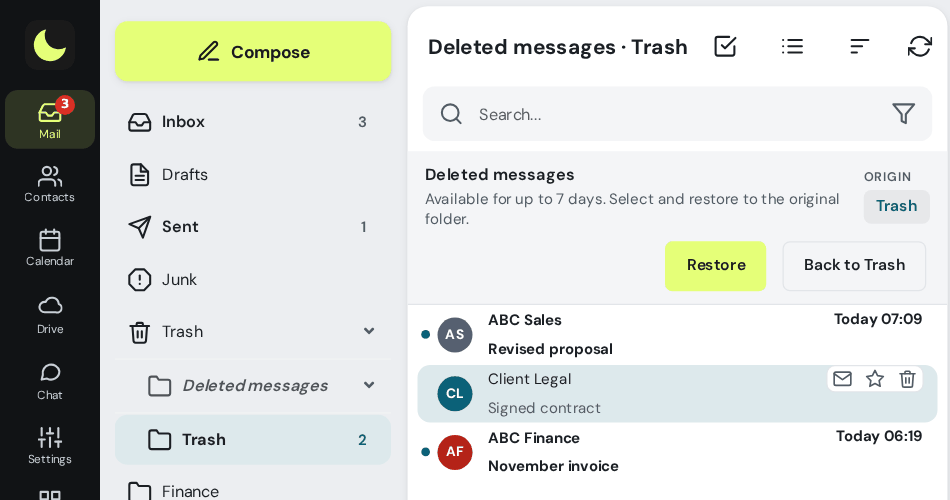
Open the Trash folder
In webmail, as always.
Click Recover deleted messages
It is in the bar at the top of Trash. The same item appears in the right-click menu on the Trash folder.
Choose the messages
The list shows what was permanently deleted in the last 7 days, grouped by the folder it came from.
Click Restore
The message goes back to the folder it came from. If you prefer, drag it to any other folder. To leave this list, click Back to Trash.
Good to know
- Applies to what was deleted in webmail, Outlook, Thunderbird or on a phone.
- Deleted messages do not count against the mailbox quota.
- Email apps do not show this area: it lives only in webmail, away from accidental clicks.
- Without the add-on, Trash and the Spam folder empty themselves after 30 days, and whatever leaves Trash is gone for good.
- It is a per-mailbox add-on and keeps whatever is deleted after you subscribe.
How companies use it
Everyday situations at small and midsize companies. The names and data are fictional.
Email permanently deleted by mistake
Situation. Someone emptied Trash and, days later, needs a message from a customer.
What the person does. Opens Trash, goes to Recover deleted messages and picks the message by its original folder.
Result. With the add-on active on the mailbox, the message goes back to the folder it came from, without opening a ticket. The screen is right above.
Questions about recovering deleted email
How long can I recover a deleted email?
With the recovery add-on, for 7 days after it is permanently deleted. While the message is still in Trash, just drag it back; Trash empties itself after 30 days.
Do I need to open a ticket to recover?
No. Users restore it themselves in webmail, in Trash → Recover deleted messages.
Where does the recovered message go?
To the folder it came from. If you prefer, drag it to any other folder.
Does it recover what was deleted on a phone or in Outlook?
Yes. It applies to what was deleted in webmail, Outlook, Thunderbird or on a phone.
Is recovery in every plan?
No. It is an add-on of R$ 2.00 per mailbox, per month, and keeps whatever is deleted after you subscribe.
See also
Want this working at your company today?
lua.email costs from R$ 8.90 per mailbox, with webmail and lua Colabora in every plan. Recovery of deleted emails is a per-mailbox add-on. You subscribe online and activation is automatic: if you pay by PIX, the account is ready in minutes for you to activate your domain. If you have questions, we answer on WhatsApp.
Subscribe now See pricing How we migratePrefer that our team contacts you? Leave your contact details