
Webmail
Email filters: every message in the right folder, no dragging
Invoices, boletos (bank slips), system notices, newsletters: it all lands together in the Inbox and what matters gets lost in the middle. Dragging messages one by one takes time every day. A filter does it on its own, on the server, as soon as the message arrives.
Signing up is online and activation is automatic: pay by PIX and the account is ready in minutes for you to activate your domain. For questions, we answer on WhatsApp.
- On all lua.email plans
- In the browser, nothing to install
- Support based in Brazil, in Portuguese
How it works at lua.email
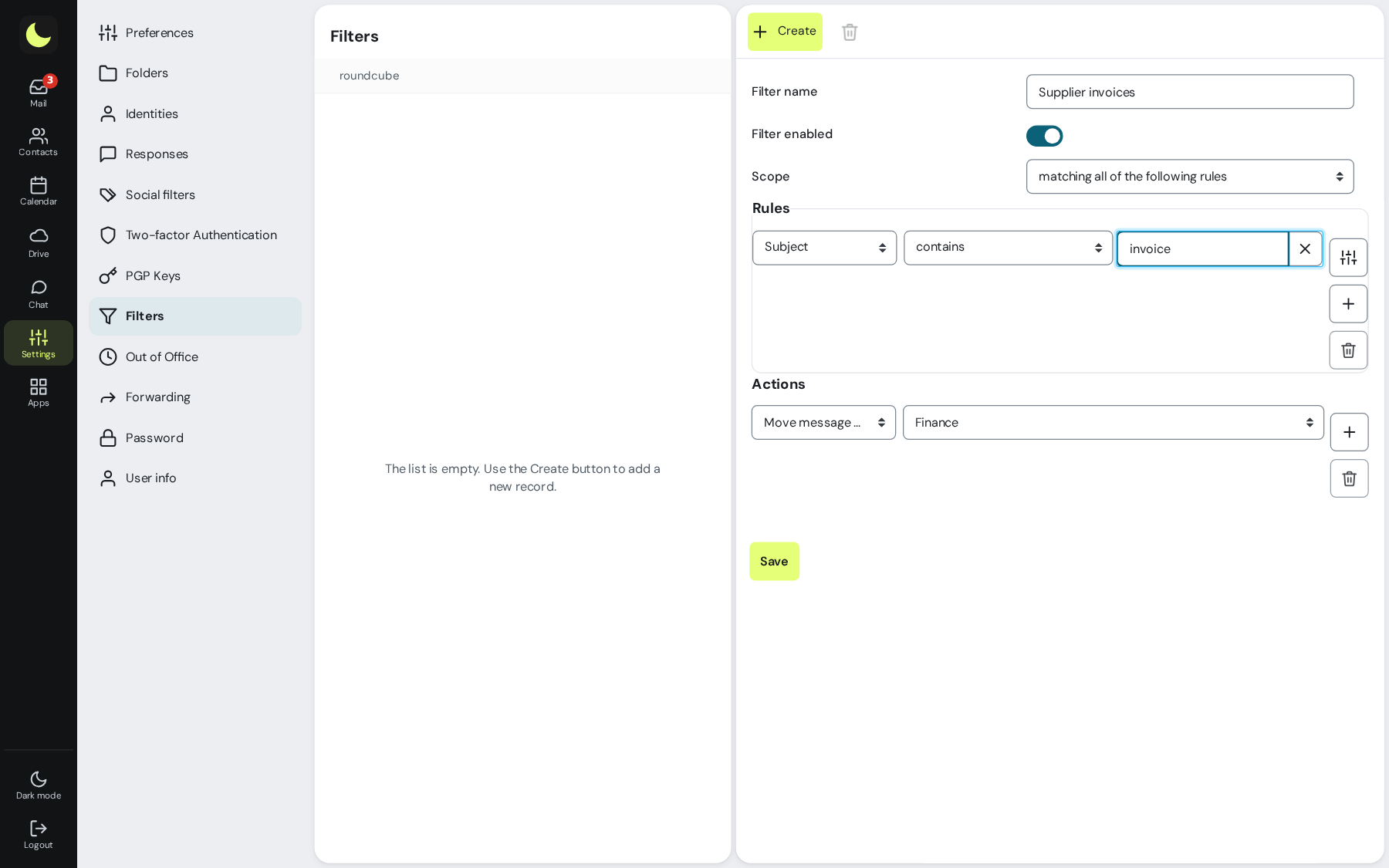
Go to Settings → Filters and click Create
Give it a name that explains the purpose, like Invoices.
Build the rules
Field, operator and value, like Subject contains invoice. Choose whether a message must meet all the rules or any one of them.
Choose the actions
Move to a folder, copy, mark as read, flag or send a copy to another address. Use + for more than one action.
Save and test
Send yourself a message that meets the rules and see where it lands.
Good to know
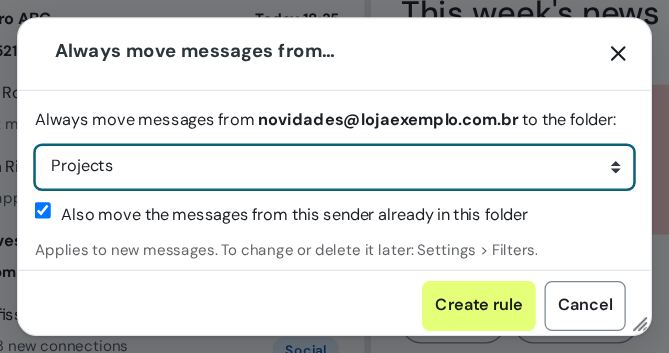
- Shortcut for a sender: select a message from them and choose More → Always move messages from…. Pick the folder and leave the box checked to also move what has already arrived.
- The rule lives on the server and applies to future messages even with webmail closed, and for people reading in Outlook or on their phone too.
- A regular filter acts on messages that arrive after it is saved. For the ones already in the mailbox, search and move them all at once.
- Filters run from top to bottom: drag to change the order. The switch next to each one turns it off without deleting it.
Questions about filters and rules
Does the filter organize the emails already in the mailbox?
A regular filter acts on messages that arrive after it is saved. The shortcut Always move messages from… has an option to also move what is already in the folder.
Does the filter work with webmail closed?
Yes. The rule lives on the server and applies to future messages, even with webmail closed, including for people reading in Outlook or on their phone.
Can I use several terms in the same filter?
Yes. Choose any rule and add a line for each term, like boleto, invoice and NF-e, all moving to the Finance folder.
Can a filter make important emails disappear?
The actions Discard, Delete and Redirect keep the message from reaching your mailbox. Prefer Move to a folder and check the folder now and then.
See also
Want this working at your company today?
lua.email costs from R$ 8.90 per mailbox, with webmail and lua Colabora on all plans. Signup is online and activation is automatic: pay by PIX and the account is ready in minutes for you to activate your domain. For questions, we answer on WhatsApp.
Subscribe now See pricing How we migratePrefer that our team contacts you? Leave your contact details