
Accounting
Business email for accounting firms
An accounting firm lives on email: invoices, statements and XML files arriving from each client, tax payment slips and boletos going out every month, and clients asking whether the slip was really sent. Email has to find what arrived three years ago, prove what went out yesterday and keep the fake boleto scam from using the firm's name.
Signing up is online and activation is automatic: pay by PIX and the account is ready in minutes for you to activate your domain. For questions, we answer on WhatsApp.
What changes in the firm's day to day
Situations every firm knows, and the feature that solves each one.
"I sent the payment slip, the client says it never arrived"
In the panel, you trace the message by the client's address and see whether it was delivered, rejected with the reason, or is still in the queue, with 180 days of history.
The fake boleto with the firm's name
Scammers love fee boletos. With DKIM and DMARC in the panel, your clients' providers start rejecting messages that pretend to come from your domain. On the way in, the antispam is right 99.91% of the time, measured by users' own corrections.
fiscal@, dp@ and nfe@ without passwords going around
Each department gets its own address. For the team to reply from the same address, use a shared mailbox; to just distribute messages, use aliases and groups, at no cost.
Finding a statement from three years ago
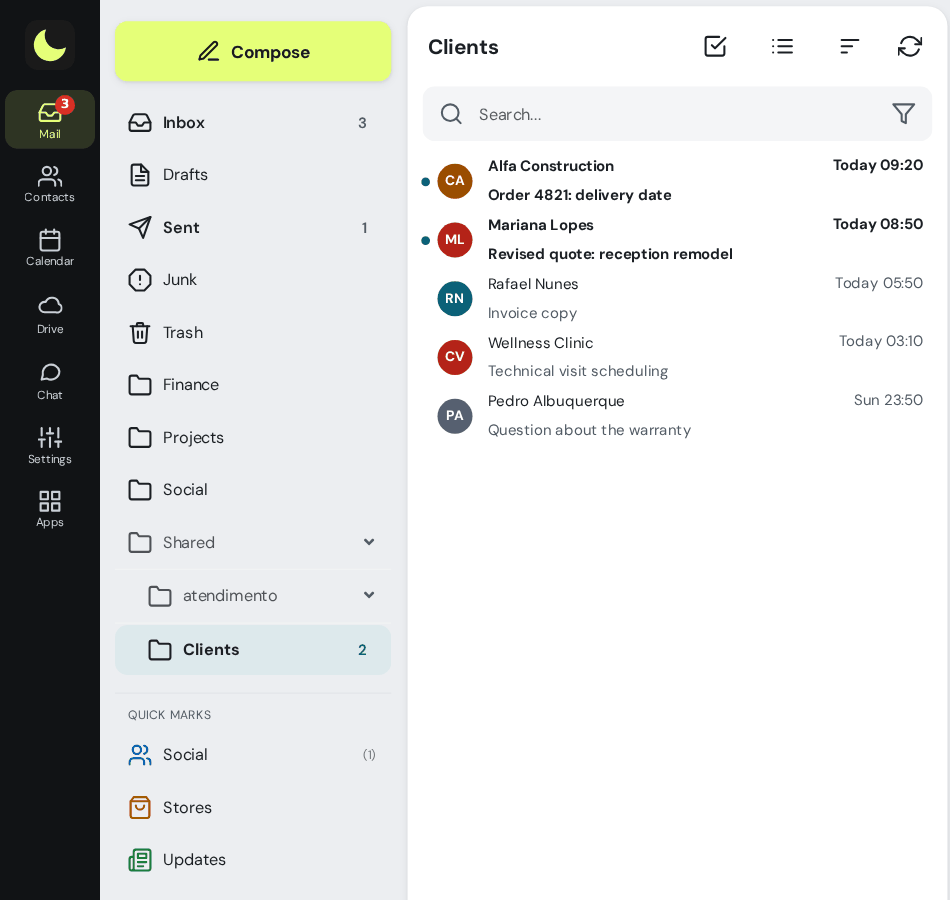
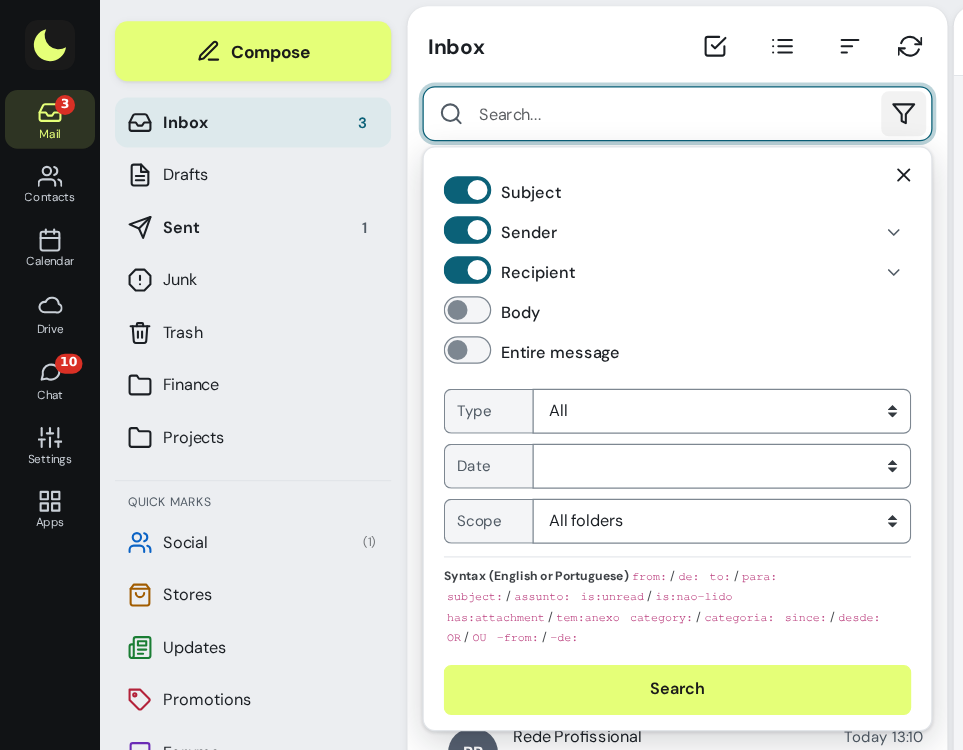
The webmail search accepts shortcuts like from:, has:attachment and since:, across all folders, and returns the whole conversation in the result.
One folder per client, no dragging
Filters send each message to the client's folder as soon as it arrives. A rule for a sender takes two clicks.
An employee leaves in the middle of the busy season
The mailbox belongs to the firm. Admins disable access in the panel and make the address's messages reach whoever took over, with the clients' history intact.
The client's document, in seconds
Search by client, by subject or only for messages with attachments, across all folders at once. A file too large to attach goes as a Drive link, with an expiration date and optional password, and the client downloads it without creating an account.
Access control for client data
Payroll, taxes and client documents go through the firm's email. In the panel, you set the rules once per mailbox group, such as payroll or tax.
Two-step verification required
The whole group registers the code, with recovery codes. See how it works
Password expiration
From 30 to 360 days, with a change at next login and a report of passwords about to expire. See how it works
Access hours and location
No email access at night, on weekends and on holidays, wherever the firm chooses. With the IP list, webmail, Colabora and phones open only on the firm's network. See how it works
Whoever leaves, leaves everything
Password reset and a list of connected phones and apps, to remove. All security features
How much it costs for a firm of 10 people
An example. Each mailbox can have its own size, and department addresses as groups are free.
| Who or what | How it works | Per month |
|---|---|---|
| 7 team members | 7 mailboxes of 10 GB (R$ 11.90 each) | R$ 83,30 |
| 2 partners, with years of history | 2 mailboxes of 50 GB (R$ 36.90 each) | R$ 73,80 |
| fiscal@, answered by the team | 1 shared mailbox of 20 GB (R$ 18.90) | R$ 18,90 |
| dp@, nfe@, contato@ | Aliases and groups | R$ 0,00 |
| Total | 10 mailboxes, with lua Colabora included | R$ 176,00 |
Price per mailbox, per month, with lua Colabora included. Subscribing is online and activation is automatic: if you pay by PIX, the account is ready in minutes for you to activate your domain. For questions, we answer on WhatsApp. Calculate for your team.
Want to see how it would look at your firm?
Count how many people you are, the departments and where your email is today. You create the addresses and choose each mailbox's size in the admin panel, with someone from our team alongside to help.
Chat on WhatsApp See pricingPrefer that our team contacts you? Leave your contact details
Questions from accounting firms
What mailbox size does an accounting firm need?
People who receive invoices, statements and XML files from clients every month usually do well with 10 GB or 20 GB. Partners with years of history, 50 GB or more. You can mix sizes on the same domain and change a mailbox's plan in the panel when it fills up.
Do fiscal@ and dp@ need to be paid mailboxes?
Only if the team replies from the same address. In that case, it is a shared mailbox, which counts as one mailbox. If the idea is just to distribute messages to whoever handles the subject, a group does the job, at no cost.
The client says they didn't receive the payment slip. How do I prove I sent it?
In the panel, tracing shows whether the message was delivered to the client's server, rejected with the reason, or is still in the queue, with 180 days of history. It shows delivery to the destination server, not whether the client opened it.
Can I send the accounting firm's large files to a client?
Yes. When an attachment exceeds the limit, webmail sends it through Drive and puts in the message a link valid for 30 days, with a QR code and optional password.
How do I bring over the history from my current provider?
With the migration tool, in the admin panel, at R$ 2.00 per GB migrated from the source, paid once, and the preview shows what will be copied before you start, or with our team, billed by the hour. Your team keeps using the old email until the switch.
Keep reading
Want a more agile firm and a smaller email bill?
The mailbox costs from R$ 8.90 per month, with lua Colabora included and support from people, in Portuguese. Subscribing is online and activation is automatic: if you pay by PIX, the account is ready in minutes for you to activate your domain. For questions, we answer on WhatsApp.
Subscribe now See pricing How we migratePrefer that our team contacts you? Leave your contact details