
Guide
Cost-benefit in business email: hosting email or workspace?
Business email exists at R$ 4 and at R$ 40 per person. What changes between them is less the mailbox space and more what the team can do with it. This guide shows what each price tier delivers, why lua.email sits in the middle and how to choose based on your team's routine, not on the number in the table.
Signing up is online and activation is automatic: pay by PIX and the account is ready in minutes for you to activate your domain. For questions, we answer on WhatsApp.
Three kinds of service with the same name
When someone says "business email", they may mean very different things. Knowing which one your company is dealing with is the first step to comparing prices.
Hosting email
From R$ 3.99 to R$ 5.59 per mailbox on the entry plan, at companies like Locaweb, KingHost and HostGator. A mailbox on your company's domain, webmail and antispam, often sold together with the website. It does the basics well: sending and receiving messages.
The big workspaces
Google Workspace and Microsoft 365, from R$ 32.72 to R$ 40.90 per person on the entry plan. Email comes inside a work suite: files, documents, chat, meetings and an admin console.
lua.email: the workspace at an email price
From R$ 8.90 to R$ 61.90 per mailbox, depending on the space. Complete business email with lua Colabora on every plan: files, documents, chat, tasks and boards, with the same login, an admin panel for IT and support from people, in Portuguese.
Prices per mailbox or user per month, according to each company's public pages checked on September 28, 2026. Details in the comparison.
What it comes to for a team of 10 people
Entry plan for each person, per month. The last column is what matters day to day.
| Option | 10 people per month | What comes with it |
|---|---|---|
| KingHost | R$ 39,90 | Email. Promotional price on the two-year plan; at renewal the regular price applies. |
| Locaweb | R$ 49,90 | Email, with the discount shown on the page. |
| HostGator (Titan) | from R$ 55.90 | Email, depending on the billing cycle. |
| lua.email, 5 GB mailboxes | R$ 89,00 | Email and lua Colabora: files, documents, chat, tasks and boards. Same price after signup. |
| lua.email, 10 GB mailboxes | R$ 119,00 | The same, with double the space. |
| Google Workspace Starter | R$ 327.20 for the first 12 months, then R$ 409.00 | Email, Drive, Docs, Meet and Chat. |
| Microsoft 365 Business Basic | R$ 334,00 | Email, OneDrive, Office on the web and Teams. |
Video meetings have a separate license, R$ 3.00 per mailbox, per month. Chat, files, documents, calendar and the rest of lua Colabora are included on all plans.
Prices from each company's public pages on September 28, 2026. On a phone, scroll the table sideways. To build a mix with different sizes per person, use the pricing calculator.
Why lua.email costs more than hosting email
Because each mailbox brings more than email. For 10 people, the difference is between R$ 33 and R$ 49 per month, or R$ 3.30 to R$ 4.90 per person. This is what it pays for.
The office comes with the email
Team folder, documents, spreadsheets and presentations edited in the browser by several people at the same time, chat, tasks, Kanban boards, whiteboard and notes. All in lua Colabora, with your email login, without subscribing to another service.
Email works together with the rest of the job
A large file becomes a link right in webmail. The calendar event already creates the meeting link. The meeting minutes start from the calendar event. An attachment you received goes to the team folder with one click.
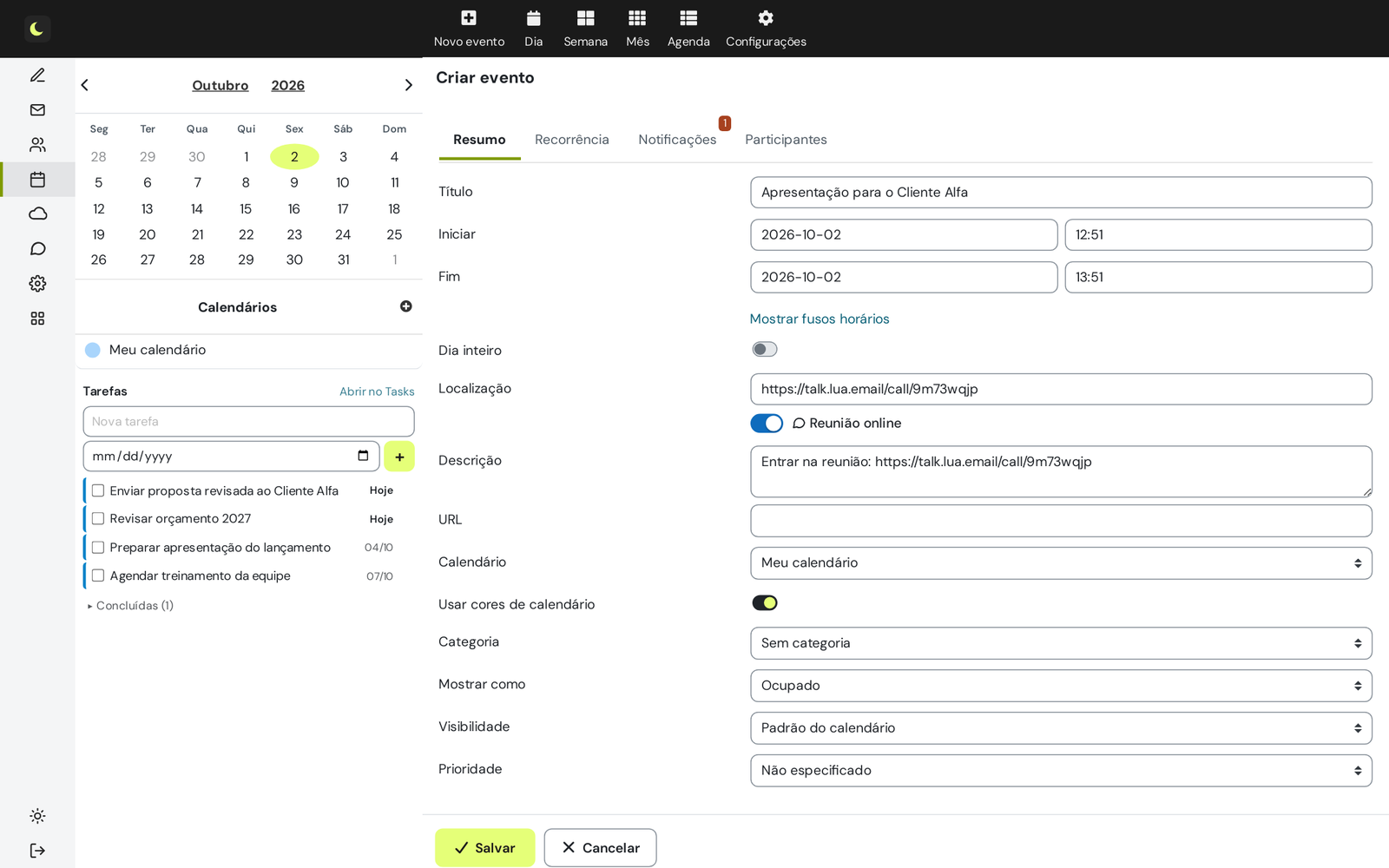
Phone set up as an Exchange account
On iPhone, Android and Outlook on the phone, the account is added as Exchange: email, calendar, contacts, tasks, auto-reply and the company directory all synced. What it looks like on the phone.
The team works together, without sharing passwords
A shared mailbox such as support@ with per-person permissions, a shared calendar, a company directory that builds itself, customer and supplier address books and aliases and groups at no cost.
When a customer says they did not receive it, you can check
The panel traces every message for 180 days: delivered, rejected or in the queue. And when an email bounces, the notice explains in Portuguese why and what to do.
Scams stay outside
The antispam is right 99.91% of the time, measured by the users' own corrections, and learns from your team. The antivirus checks attachments on the way in and on the way out. DKIM and DMARC are set up from the panel, and two-step verification can be required per group.
Email-only servers, with off-site backup
Email does not share a server with websites. Messages are backed up outside the main server, and users can recover what they permanently deleted (add-on).
A team alongside you, in Portuguese
You manage from the panel and the team supports you when needed, based in Brazil. The switch is done by the panel's migration tool or by our team, who follow DNS, Outlook and phones with you. And the price at signup is the price afterward.
What lua.email includes that hosting providers do not show
We checked the business email pages of Locaweb, KingHost and HostGator on October 28, 2026. None of them mentions the controls below, which at lua.email come with every plan, with no separate package. With them, the company manages team access from the panel, not just the mailboxes.
| Feature | lua.email | Locaweb | KingHost | HostGator (Titan) |
|---|---|---|---|---|
| Files, documents and chat | ✓ lua Colabora on every plan | Not stated | Not stated | Drive and chat on larger plans; editor and video calls not stated |
| Mailbox groups with rules for the whole team | ✓ Service groups | Not stated | Not stated | Not stated |
| Access hours (outside working hours and on holidays) | ✓ Per group | Not stated | Not stated | Not stated |
| Browser session time and "keep me signed in" | ✓ Per group | Not stated | Not stated | Not stated |
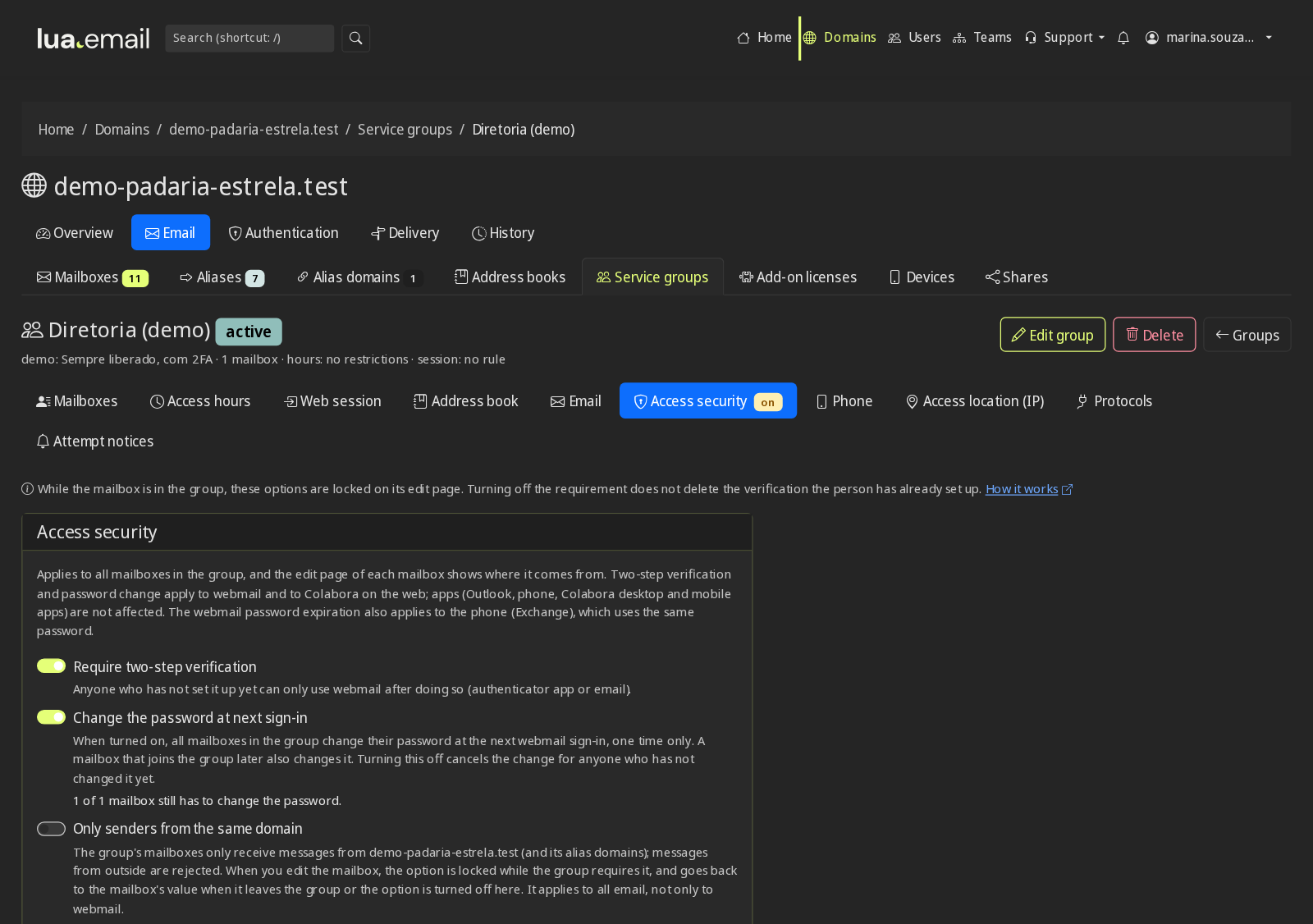
| Two-step verification required by the administration | ✓ Per group or for the whole domain | Not stated | Not stated | 2FA on the Premium plan, no administration requirement stated |
| Mandatory password change at next sign-in | ✓ | Not stated | Not stated | Not stated |
| Phone as an Exchange account, with a device list and security policy | ✓ Device management in the panel | Not stated | Not stated | Apps for Android and iOS |
| Panel roles: administrator, helpdesk and read-only | ✓ Access teams | Not stated | Not stated | Not stated |
| Failed logins and a record of who did what in the panel | ✓ | Not stated | Not stated | Not stated |
"Not stated" means the provider's public page does not mention the feature, not that it does not exist. On a phone, scroll the table sideways.
lua Colabora: the office alongside the mailbox
Team folder, documents, spreadsheets and presentations edited by several people at the same time, chat with groups by department, video meetings with outside guests, tasks and Kanban boards, whiteboard, notes and the meeting minutes created from the calendar event. All with your email login and within the mailbox's space.
Service groups: one rule for the whole team
You put the front desk, field crew or finance mailboxes in a group and set the rules once. Anyone who joins the group inherits the rules; anyone who leaves loses them. Once published in Colabora, the group becomes a sharing destination: folders, documents, calendars and a chat conversation with everyone in the department, updated within 1 minute. How groups work.
Access hours and session time
The field crew does not sign in to email at night, on weekends or on the domain's holidays, with one click on "outside business hours". And you decide how many hours the session stays open in the browser and whether people can use "keep me signed in". Access hours.
Two-step verification and password change, required
It does not depend on each person remembering to turn it on: two-step verification becomes mandatory for the finance group or for the whole domain, and a new mailbox is born already asking for the temporary password to be changed. When editing a mailbox, the panel shows that the rule came from the group.
Phone management
Each phone with an Exchange account appears in the panel, with security rules per group and removal with a record. The details are right below.
Teams, roles and records
Outsourced IT handles "I forgot my password" as helpdesk without touching DNS; finance checks mailboxes and logs as read-only. Failed logins appear with the source IP, the panel keeps a record of who did what, and Lua support access to a mailbox has a time limit, a reason and a record. Access teams.
Device management: what the administration controls on phones
On iPhone, Android (Samsung Email and Gmail) and Outlook on the phone, the account is added as Exchange and syncs email, calendar, contacts, tasks, auto-reply and the company directory. From the panel, administrators monitor and control these devices.
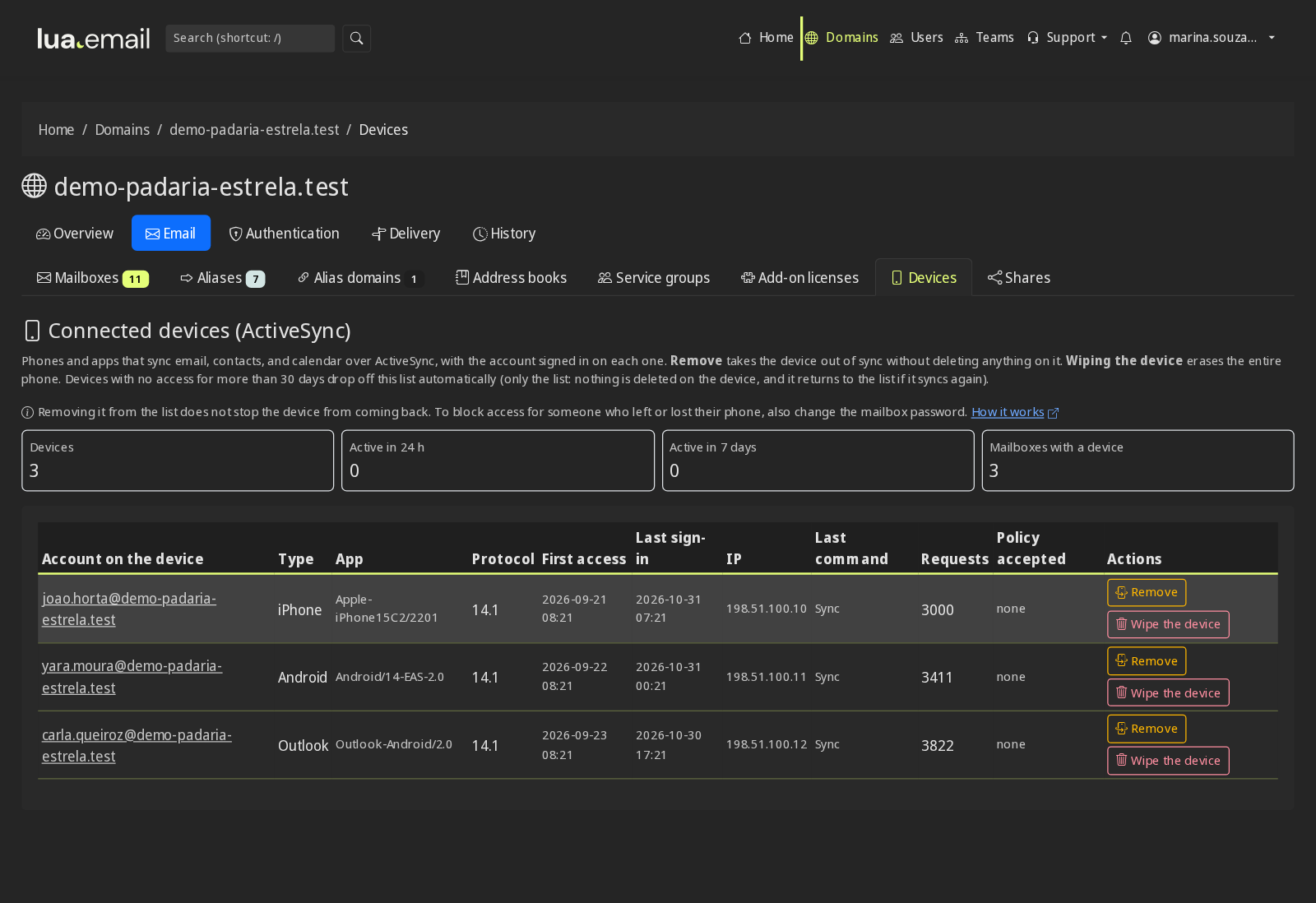
- Device list for the domain and for each mailbox: whose it is, the type, the app, the protocol version, first and last access, the IP, the last command and whether it accepted the policy.
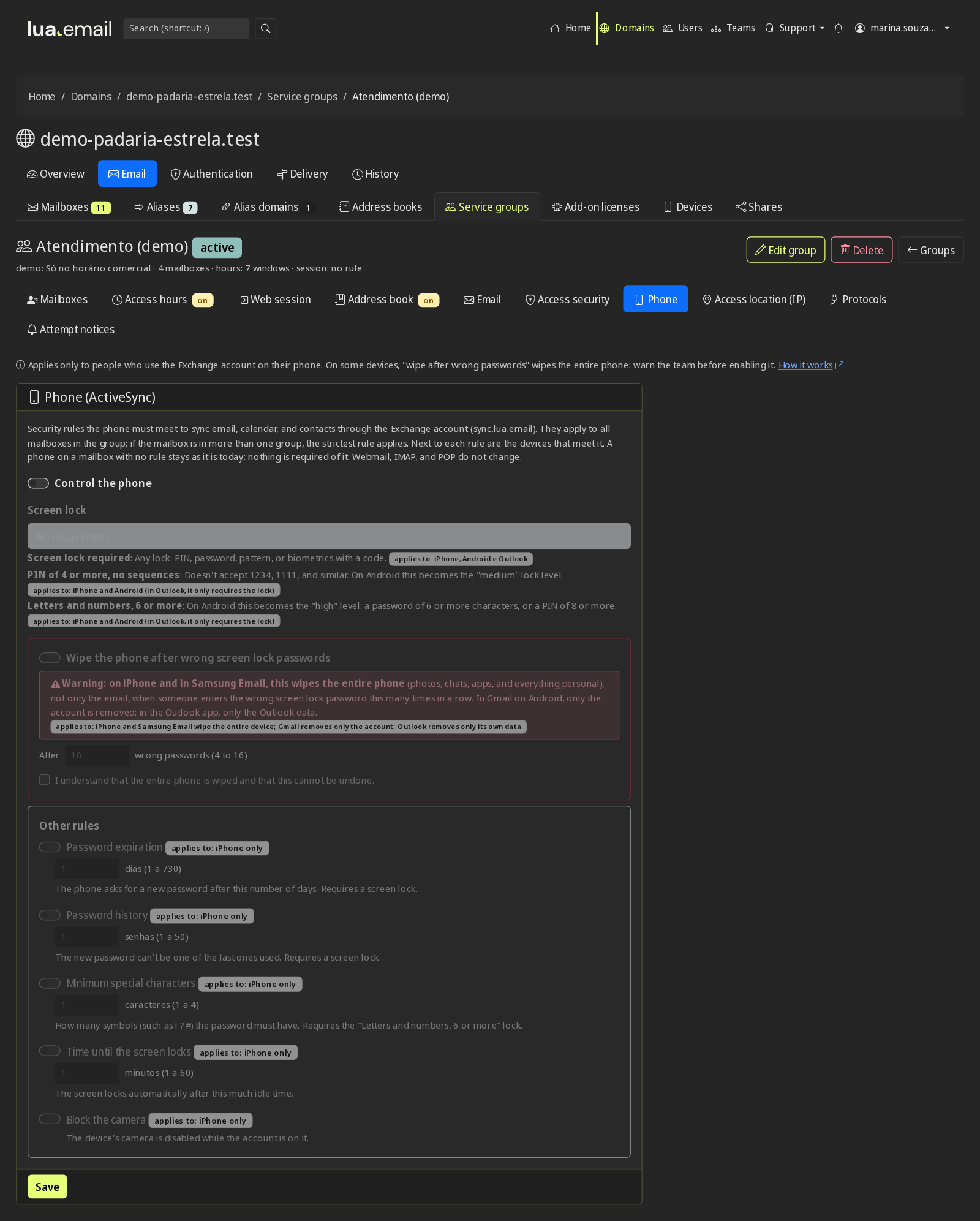
- Mandatory screen lock at three levels: any lock, a PIN of 4 or more digits with no sequences, or a password of 6 or more.
- Wipe after wrong passwords on the lock screen (4 to 16 attempts), with a warning before saving, because on some devices this wipes the entire phone.
- Extra rules on iPhone: password expiration and history, special characters, time until the screen locks and camera blocked. The panel shows on which devices each rule applies and only offers what some device meets.
- Per group or for the whole domain: the policy goes on the Phone tab of the service group. With more than one group, the most restrictive applies, and the mailbox page shows the policy that applies to it.
- Remove a device from the account (old phone, stuck sync, someone who left the company), with a reason and confirmation. Together with a password change, the device stops syncing.
- Record of every request: who asked, from which IP, when, the reason and the result, also in the panel audit. Only the administrator can request; helpdesk and read-only can follow along.
- Always a clean list: a device with no access for 30 days leaves the list on its own, without deleting anything on it.
The cost that does not show up on the email bill
When a company compares only the mailbox price, it leaves out what the team spends working around what is missing. It is worth looking at the routine:
- One subscription for video meetings, another for storing files, another for sending large files.
- The finance@ password going around in a chat group because three people need to answer from it.
- The afternoon lost trying to find out whether the proposal arrived, with no record to show the customer.
- The spreadsheet that goes back and forth as an attachment, with five versions and none of them right.
- The fake boleto that got past the filter and was almost paid.
If any of these situations sounds familiar, the difference of a few reais per person is usually worth it. If none of them happens at your company, hosting may be enough, and that is fine.
And why it costs less than a third of Google and Microsoft
The lua.email entry plan (R$ 8.90) is less than a third of Google Workspace Starter (R$ 32.72 in the first year) and Microsoft 365 Business Basic (R$ 33.40). The difference comes from what each one puts in the package, not from what is missing in the day to day of a small or midsize company.
The essentials of a workspace are here
Email, calendar, contacts, files, documents in Word, Excel and PowerPoint formats, chat, meetings, tasks and an admin panel. See the side by side in the comparison.
You pay for the space each person uses
Mailboxes from 5 to 200 GB, mixed within the same company. People who only read email stay on 5 GB; people who keep projects take the largest. Nobody pays for the full package without needing it.
Those who need Office installed do not have to leave
If some people depend on Office on the computer or on Google and Microsoft integrations, they stay there, and the rest of the team comes to lua.email, on the same domain, with lua Bridge. The expensive license stays only with those who use it.
Want the numbers worked out for your team?
Tell us how many people your company has and what you pay today. Someone from our team puts together the comparison with your current plan, with no obligation.
Chat on WhatsApp See pricingPrefer that our team contacts you? Leave your contact details
How to decide
Each option makes sense for a type of company. The right question is what the team does during the day.
Hosting may be enough if...
the team only exchanges short messages, does not share mailboxes or calendars, keeps files somewhere else and has never had trouble with scams or email that does not arrive.
lua.email is the right choice if...
the team needs email that reaches the inbox, with files, documents and chat together, shared mailbox and calendar, phone as Exchange, send tracing and people to help, paying per mailbox from R$ 8.90.
Google or Microsoft make sense if...
the whole team depends on installed Office or on those suites' own integrations. If it is only part of the team, you can mix with lua Bridge. Thinking of leaving? See the alternative to Google Workspace.
Questions about price and cost-benefit
Which business email has the best cost-benefit?
It depends on what the team uses. If it only exchanges messages, hosting email does the job at the lowest price. If the team also stores files, edits documents, holds video meetings, shares mailboxes and calendars and needs email working as Exchange on the phone, lua.email delivers that whole set from R$ 8.90 per mailbox (video meetings are licensed separately), with lua Colabora included: less than a third of the entry plan of Google Workspace (R$ 32.72 for the first 12 months) and Microsoft 365 (R$ 33.40), according to the public pages checked on September 28, 2026.
Why does lua.email cost more than email from Locaweb, KingHost or HostGator?
Because each mailbox brings more than email: it comes with lua Colabora (files, documents and spreadsheets in the browser, chat, meetings with outside guests, tasks and boards), an Exchange account on the phone, shared mailbox and calendar, a company directory, tracing of every message for 180 days, non-delivery notices in Portuguese, antispam with 99.91% accuracy measured by user corrections and support from people. For a team of 10 people on the entry plan, the difference from hosting providers is between R$ 33 and R$ 49 per month.
Is lua.email a workspace like Google Workspace and Microsoft 365?
Yes. It brings together email, calendar, contacts, files, a document, spreadsheet and presentation editor (Word, Excel and PowerPoint formats), chat, video calls, tasks, Kanban, whiteboard and notes, with the same login and an admin panel. What it does not include is Office installed on the computer; those who depend on it can keep just those accounts at Microsoft and the rest on lua.email, on the same domain, with lua Bridge.
What admin controls does lua.email have that hosting providers do not show?
Service groups with rules for the whole team: access hours (outside working hours and on holidays), browser session time, and two-step verification and password change required by the administration. Also management of phones with an Exchange account (device list, screen lock policy, remove device), teams with administrator, helpdesk and read-only roles, failed logins with the IP and a record of who did what in the panel. The business email pages of Locaweb, KingHost and HostGator, checked on October 28, 2026, do not mention these controls. At lua.email, they come with every plan, together with lua Colabora.
What can be managed on the team's phones through lua.email?
Phones with an Exchange account (iPhone, Android and Outlook on the phone) appear in the panel with the account, the app, the last access, the IP and whether they accepted the policy. The administration requires a screen lock at three levels, can have the device wiped after several wrong passwords on the lock screen and, on iPhone, can set password expiration, time until lock and camera blocked. The policy applies per group or for the whole domain. A device can also be removed from the account, with a reason and a record of who asked.
How much does lua.email cost for 10 people?
R$ 89.00 per month with 5 GB mailboxes or R$ 119.00 with 10 GB mailboxes, with lua Colabora included. You can mix sizes within the same company, and aliases and groups such as sales@ and finance@ cost nothing.
Does the lua.email price go up at renewal?
There is no introductory promotional price: a mailbox costs the same at signup and afterward.
Is it worth switching from hosting email to lua.email?
It is if your team already feels something is missing: a large file that will not fit as an attachment, a meeting on a separately paid tool, the support mailbox password passed from hand to hand, a customer who says they did not receive it and nobody can prove otherwise, a phone that does not sync the calendar. If none of this happens, hosting may be enough.
Can I start with just a few mailboxes?
You can. You subscribe only to the mailboxes you need now, all with what comes in the plans, and add more when your team grows. The messages are migrated with the admin panel tool (R$ 2.00 per GB migrated from the source) or by our team (by the hour, on request).
Keep reading
See the difference with your team
At lua.email, each mailbox costs from R$ 8.90 per month, with lua Colabora on every plan and support from people, in Portuguese. Subscribing is online and activation is automatic: pay by PIX and the account is ready in minutes for you to activate your domain. Questions, we answer on WhatsApp.
Subscribe now See pricing How we migratePrefer that our team contacts you? Leave your contact details